Why Too Much Money is Worse than Too Little

Why Too Much Money is Worse than Too Little

Many entrepreneurs believe that the lack of capital is their primary problem. If only they had a fat bank balance, they could kick butt. As a venture capitalist, I’ve seen what happens when companies raise substantial capital. It’s not pretty—in fact, my theory is that too much money is worse than too little. Here’s why.

1. Expenses expand to the level of funding.
Funny how this works: companies create projections that use the money that they have. The availability of money makes them think of ways to spend it, so there’s less emphasis on doing the right things the right way. The logic becomes, “Our investors gave us this money to invest, not to collect interest in the bank. They want us to scale up and go for it, so we should spend it. We know we’ll meet our milestones, and our competition is a joke, so we’ll always be able to get more money.” 

2.
Money creates a false sense of security.
Companies divide the amount of money that they have by their monthly expenses. This figure is a company’s “runway” or the number of months that it can survive. There are three problems with this calculation: first, expenses always rise, so the number of months decreases. Second, products are always late, so that any revenue that company counted on to extend the runway don’t materialize. Third, just because a company has the money doesn’t mean that investors won’t ask for it back. Trust me: I’ve seen it happen, and no one was more shocked than the management of the company.

3.
Money makes companies hire “proven” people.
When companies don’t have money, they hire unproven people who are young, inexperienced, cheap and smart. When companies have money, they hire proven people from existing companies who are old, experience, expensive and lucky. These folks are accustomed to secretaries, first-class travel, and staying in the Four Seasons. You read it here first: proven people are over-rated. Oh, their resumes are great, and they look great on your website, but they didn’t cause the success of their former companies. They just happened to be there when these organizations succeeded. 

4.
Money makes companies buy people with salaries.
No matter what kind of people you hire, when companies have money, they use it to hire them. This is instead of reality distortion (aka, “evangelism”) and stock options. The thinking about stock options goes like this: “Options are the most expensive form of compensation since the company is going to be bigger than Google and Apple combined. Let’s use money. It’s cheaper.” When a company doesn’t have money, it has to use evangelism and options, and this is better for everyone because these types of compensation attract the right kind of people for a startup. 

5.
Money causes dependence on experts and vendors.
When a company has money, it looks outside for “world-class” experts and vendors—after all, “the investors gave us this money to build the best company possible in the shortest time possible.” This is when the consultants and agencies start charging the company $200/hour for the Asian art-history major who’s been out of Princeton for a year. If a company doesn’t have money, it figures out cheap ways to get results. It develops the aforementioned young, inexperienced, cheap and smart people because it has no choice but to make them effective.


6.
Money makes entrepreneurship look like a serial process.
When companies have money, their thinking is serial: first they raise money, then they create the product, then they sell it, then they collect revenues, and then they meet with Goldman, Sachs for their IPO roadshow. The reality is that entrepreneurship is not serial—it’s a parallel process in which companies must raise money, create a product, sell it, collect revenues, and not have time to meet with Goldman, Sachs at the same time. Companies that work in a serial method are doomed because most markets move too fast for that approach.

If your company is short of money, I hope that you feel better now. The factors that ultimately make you successful may be in place. On the other hand, if your company has a boatload of money and investors who say that they “really believe and support your management,” keep your resume current.

New Link Structure that is producing results

In order to understand this link structure, you will need to have basic info on the following.

1. WEB 2.0 Sites.
2. Profile Sites
3. Social Bookmarking
4. RSS Feeds
5. ScrapeBox Commenting (Optional)

The problem
with most of us is that we do all this individually and once we create a backlink we just leave it as it is.

What we should do?
Add MORE Value to those backlinks that we create.

How do we do that?
Add more supporting backlinks to the backlink that you create.

For example, lets look at WEB 2.0 Sites.
There are numerous web 2.0 sites.
To name a few,
Goarticles
Ezine
Blogger
Wordpress
Wetpaint
Tumblr
Hubpages

A typical person would just write an article and once it is posted with his anchor text backlink, he is satisfied and thinks that the job is done.

Yeah, it is done. But really you should make your backlink more valuable.
Add numberous links to the backlink.

Here is a picture, for better understanding.
Circles represents profile links.

Linking Method
1. Create a tumblr post. (Grab the url of the post)
2. Create profile links (around 10 profile links for that tumblr post)
- Rem that DON’T overspam profile links. JUST 2 links per profile. Hint: You can have one link pointing to Tumblr while the other point to another Web 2.0 property. Best practice: Find your own profile links.
3. Social bookmark every single profile link. Social bookmark the tumblr post.
4. Create a RSS of your profile links and send it to RSS Aggregators.
you can create a feed from almost any site. This had been mentioned numerous times. google should help too.
5. Blog commenting – Use scrapebox. set the name to genuine names and spin some good comments and do a blast on all the links created. Profile Links & Web 2.0 property.

Even tho, it is just a single site that is pointing to your site. It has value and google likes valuable links instead of overly spammed blog comments.

Too much work?
Yeah. But there are automated tools.
I am thinking of creating my own automated tool and releasing too.
It would do the whole job in a click. REALLY in a click.
But, i am not that good with BOTS yet. Anyone wanna join me? PM Me.
Alternatively, you can outsource the work.
There are people in 3rd world countries where they are willing to do the whole work for $10-$15 excluding article writing.

Banned AdSense Publisher Gets His Money Back from Google

It’s not uncommon to hear stories of disgruntled AdSense publishers whose accounts have been permanently banned by Google either due to "non-compliance with AdSense policies" or for "posing a significant risk to AdWords advertisers."

The compliance issue is almost always related to content. For instance, if any particular website is centered around banned topics (like gambling or pornography), Google can disable AdSense serving for that website.

The next issue is more serious as it relates to "click fraud".  No one obviously has a clear understanding of how Google determines "invalid clicks" but such an activity can invite an AdSense ban for life. There’s an appeal process at Google but again it doesn’t guarantee that your AdSense account will be reinstated even if you provide all the required details (like web server logs).

Aaron Greenspan was another happy AdSense user until he received an email from Google saying that his account has been cancelled.

While going through our records recently, we found that your AdSense account has posed a significant risk to our AdWords advertisers. Since keeping your account in our publisher network may financially damage our advertisers in the future, we’ve decided to disable your AdSense account.

Aaron writes in Huffington Post that his AdSense account was disabled without warning and he literally ran from pillar to post at Google trying to reach everyone from the AdSense Customer Service to the Legal Team to Google forums but with no success.

If an AdSense publisher’s account is disabled for invalid clicks, he is not entitled to any further payment from Google and all the current earnings are returned to the corresponding AdWords advertisers. The same happened to Aaron as he had made around $721 from AdSense but the payment was stopped after the account was disabled.

With literally no options left, Aaron made a final attempt and filed a civil lawsuit for $721.00 (the amount Google owed to him) saying that Google could not prove any wrongdoing and that Google’s fraud detection algorithm was imperfect. All he had to pay was $40 as the court fees for this lawsuit.

The AdSense account was disabled on December 9, 2008, he filed the lawsuit against Google on January 15, 2009 and on March 2, 2009, the judge delivered the following verdict:

I don’t think I have the power here in Palo Alto small claims court to make you reinstate his account, but I think you owe this young man $721. I think there might be money in Google’s treasury for that.

Google paid him all the "due" AdSense earnings along with the court fees though his account still stands cancelled.

I think a big reason why Google lost this case is because their lawyer couldn’t convince the judge about how "click fraud" was detected in first place. Google has good reasons to not disclose their fraud detection algorithms in public court cases but the fact that this decision went against Google could probably convince many more ex-AdSense users to follow the footsteps of Aaron.

source: www.labnol.org

No Ads On Google

Google Search Without Adsense Shhhh!Google makes most of their money from online advertising.

While it is technically possible to block Google ads on web pages through Firefox extensions or by modifying the hosts file, these hiding methods are mostly implemented by tech-savvy users and may not have that big an effect on Google's revenue.

However, here's a secret trick - if you append the parameter "output=googleabout" to Google Web Search URL, the search results page will not carry any AdSense ads that are otherwise seen on the top and right sections of the page.
Here's a direct URL to search Google minus Adsense/Adwords ads:

google.com/search?output=googleabout

Not sure why this parameter is in place but this default Google page could have a serious impact on their bottom line since it allows users to search Google sans advertisements without installing any geeky hacks. Thanks Vedrashko.
The following lines, when added to the Windows HOSTS file, will block Google from serving ads on your computer and won't track your visits on sites that use Google Analytics.
# [Google Inc]
127.0.0.1 pagead.googlesyndication.com
127.0.0.1 pagead2.googlesyndication.com #[Google AdWords]
127.0.0.1 adservices.google.com
127.0.0.1 ssl.google-analytics.com #[urchinTracker]
127.0.0.1 www.google-analytics.com #[Google Analytics]
127.0.0.1 imageads.googleadservices.com #[Ewido.TrackingCookie.Googleadservices]
127.0.0.1 imageads1.googleadservices.com
127.0.0.1 imageads2.googleadservices.com
127.0.0.1 imageads3.googleadservices.com
127.0.0.1 imageads4.googleadservices.com
127.0.0.1 imageads5.googleadservices.com
127.0.0.1 imageads6.googleadservices.com
127.0.0.1 imageads7.googleadservices.com
127.0.0.1 imageads8.googleadservices.com
127.0.0.1 imageads9.googleadservices.com
127.0.0.1 partner.googleadservices.com
127.0.0.1 www.googleadservices.com
127.0.0.1 apps5.oingo.com #[Microsoft.Typo-Patrol]
127.0.0.1 www.appliedsemantics.com
127.0.0.1 service.urchin.com #[Urchin Tracking Module]

Source: www.labnol.org

My ebay Business Strategy

The key to making enormous profits on eBay is to develop a detailed and efficient strategy long before you list your first item.  First you need to know what type of product you want to sell, where to find your niche market on eBay, and develop a profile of your average customer.  In addition, you should already have determined which categories are appropriate for your product. Now you are ready to set your strategy for the business.

I'm going to present you with a strategy that you can apply to virtually any product you wish to sell on eBay.  I will generalize the outline so you can fill in the specifics related to your own particular niche market and merchandise.

There are two types of sellers on eBay which I will call High Volume Listers and Low Volume Listers.  High Volume Listers are those who list more keep more than 10 auctions online at a time.  Low Volume Listers keep fewer than 10 auctions online at a time.

The profit margin of the product you sell determines which category you will fit into.  For example, if you sell real estate and make $10,000 per sale, you may only need to list a few properties each week on eBay to make a real killing with your internet business.  The same applies for the sale of expensive jewelry, automobiles, and other items with a large profit margin.  However, if you sell magazines or other inexpensive items you may only make $5-10 per sale.  In this case, you would need to list hundreds of items at a time to make large profits, and thus you would become a High Volume Listing. 

I know what you're thinking - why would anyone go through the effort of listing so many items when it seems so easy to list a few large items and make a fortune? The answer cuts to the heart of internet sales itself: ONLINE BUYERS ARE MOST WILLING TO SPEND UNDER $50.00 FOR A PRODUCT. This makes sense - would you pay thousands for something you have never seen?  Another reason that High Volume Listers are more common and often make more money on eBay is that it is very easy to buy inexpensive items at wholesale prices, but very difficult to buy real estate or automobiles at wholesale prices.

Armed with this information, you must consider the product you're selling and make an intelligent, informed decision on whether to become a High Volume or a Low Volume Seller.  If you have plenty of free time to devote to your new business, I recommend you opt for the High Volume option. But if you are an eBay seller at nights and on weekends, you may wish to start off with the Low Volume option until your business really takes off. Again, only you know best which option to choose based on the amount of time you have available and the profit margin of your merchandise. Once you determine what type of seller you will be, you are half-way to developing a sales strategy on eBay. 

The next step is to integrate everything you have learned so far in this manual and project your selling strategy into the future.  For example, let's assume you have decided to sell jewelry on eBay.  Here is a test case for consideration:  You have identified your niche market and found the associated categories.  You know that your buyers will probably spend $50.00-100.00 per purchase and you realize that the average profit of your auctions will be about $60.00.  You have plenty of time and your profit margin is low, so you decide to become a High Volume Seller on eBay and choose to list 100-200 auctions per week.  You estimate that 70% of your auction will end with winning bids, which is the eBay average.  Based on this prediction, you calculate your weekly income at $6300.  Using database software, you plan to keep track of your auctions and use the built-in market analysis feature to discontinue unpopular items and relist the popular ones.  You have a wholesale account set up with your jewelry supplier and have already purchased enough inventory to cover your first week of eBay sales.  You plan to relist every auction as soon as it ends and place one weekly order to fill your inventory along with one weekly outgoing mailing to your buyers.  Your basic sales strategy is set and you are ready to begin listing your auctions!

In the example above, you will notice that the seller thought of EVERYTHING before listing a single item, making sure that he/she was prepared for the task ahead and establishing a solid game plan.  Before beginning, you should project your sales strategy into the future and run through all possible problems, resolving them in your mind.  If it helps, write out a paragraph like the one above and analyze it for errors of logic.  KNOW YOUR SALES STRATEGY BEFORE YOU BEGIN.

Marketing Your Online Business

Now is the time to market to your target market. Each Internet Business Model is different. Therefore, you don’t market each and every one of them the same way. The truth is, not all Internet Business Models depend on a good search engine listing. In fact, some of them are not designed to be listed by search engines at all! That is simply because each Internet Business Models have different objectives and set up. That also means they require different marketing strategies and tactics to make it work.

Not knowing the different Internet Marketing approaches that are available for different Internet Business Models can be expensive. It will result in spending more time, money and effort than is necessary for promoting your Internet Business.

Tracking sales and visitors to your website

The purpose of the last step is to determine your conversion rate of visitors into customers. This can be easily done if your web host provides a site statistic. A good conversion rate from a Killer Sales Letter is 1 – 3% (depending on the price of the product). In other words, for every 100 targeted prospects who visit your site, at least one of them will buy your product or pay access to your service. If the conversion rate is higher than 2%, then you are doing very, very well with your Internet Business!

On the other hand, if your sales letter’s conversion rate is less than 1%, then you will need to take quick action to make your site sell more effectively. You may have to do more compelling copy writing, change the layout of your web pages or simply get a better and more attention-grabbing headline (which is so vital that it can make or break a sale!). Whatever you need to do, you have to increase your conversion rate from poor to excellent!

To track visitors, you can subscribe to counter services if your web-hosting doesn’t have a site statistic feature built in. To track sales, check your Credit Card Payment Processor.

Earn 10$ Easily

his amount of money doesn’t seem like much to me these days but I do remember back when I was just making a few bucks per day online, and at the time, it was nice.

I don’t own or do I have any vested interest in this site.

www.minuteworkers.com


This is a site where you can pay peeps to do stuff for you (join forums, fill out surveys, ect)


A lot of people on there can be paid $.10 for an e-mail submit. So if you have an offer that pays $.90. That can end of being a good return on investment. Earning $90 will take $10 of investment


So, the problem with this type of scenario is because you are paying people to complete jobs for you, you need to use offers that ALLOW Cash Incentives, unless you want to do it the Black Hat way and risk getting banned and not getting paid.


The best network I have ever seen for that is ‘Revenue Universe’, they have a lot of offers that allow cash incentives, but many other networks do as well. That’s just the best one I’ve come across. They pay Net 30 though, which kinda sucks.


Okay, back to the MW’s site.


Once you’ve signed up go to create a job in the back office.


You’ll have the option of selecting which category the job belongs to.


You can get away with paying workers $.10 but keep in mind that the more you pay, the faster your quota will be reached.


Everything from there is fairly self explanatory, but reply to this thread if you have any questions.


In the the Proof Required Section, I would put something along the lines of:


“When you get to the page after you hit ‘submit’, please write the first word on the page”


Something along those lines so you know the worker finished the job, otherwise you can reject payment.


It takes about a day for the site owner to approve the job.


Your job will also get completed a lot faster if you use “Featured Job”. It just costs $2.00 extra.


Anyways, have fun with that. It’s not big money, but it’s a start.

Running Your Business from a Coffee Shop – The World’s Most Flexible Job

Coffee shop laptopWalk into your local coffee shop on any given day and you might be surprised at how many people are sitting there, drinking coffee in the middle of a work day. There are sure to be some regular coffee shop patrons in residence, sipping their coffee and typing away on their laptops. Ever since coffee shops started regularly advertising free WiFi for customers, many people who work from home have been flocking to their local coffee shops to work. If you’ve ever wondered what kind of jobs these people have that allow them to spend their days surrounded by the aroma of freshly brewed coffee and a hipster vibe, you’re not alone.

It’s not as difficult as you might think to start a business in which you can work from home; or from a coffee shop for the matter. Ever since the internet became a mainstream luxury, many people have been discovering the joys of running their own online businesses. These businesses could sell products from cosmetics to timeshares. The only limits to what you can sell online are your own imagination and preferences. There is a wealth of resources open to people who are looking to start their own business online.

The most important step to getting started is finding a program or business plan that you like. Most people begin this step by researching potential businesses on the internet. You can choose to get into network marketing, selling products from a company, or even freelance services in whatever field you’re currently in. There’s a lot of money to be made online and the only reason that more people aren’t doing it is that they’re bound by the perception that people who work from home are lazy. The truth is that people with online businesses have to work hard to make their businesses successful, but, if they do, the rewards are great.

Once you make the decision to work from home, it’s really up to you where you actually do that work. You can do it at home, but you can also spend the day in the local coffee shop, the library, or even on vacation, as long as there’s an open internet connection and you want to spend that time working. Ultimately, if you want to run your own internet business, there are many doors open to you. All you have to do is make the decision to walk through one.

Source: www.plrinternetmarketing.com

3 Steps To Get Your New Website Indexed In 2 Days

Last time we have shared how to index your website in 24 hours and now Lee frommyblog2day is sharing some more SEO tips to get your blog getting indexed quickly in search engine.

Whenever we build a new blog or website, we always want it to be indexed by Googleas soon as possible. Usually it will take about 1-2 weeks for Google to crawl and index your new blog or website, in fact we can make the index process even faster, it may take 1-2 days to get indexed. There are many ways where you can do to make the index process faster, such as blog commenting, link exchange, and etc.

Recently I create a few micro niche websites which target high paying keywordswith minimum competition, usually the websites have only 1-2 pages each. After I setup the website, I’ll do something to get them indexed as soon as possible. If the competition is low, definitely it will rank well and start receiving organic traffic.

What I did was very simple, I’ll test the micro niche website in a list of website value sites, website value site is website that tells you the value of your website, says how much it worth and etc. Normally these sites have high pagerank and easy to get indexed by Google. Therefore, whenever you test your site, the website value site will generate the result in a new page. With that said, you’ll have a backlink from each website value site you submit. Once the new page is indexed by Google, then your link will be easily crawled by Google spider and will be indexed soon.

3 Steps To Test Your Website And Get A Backlink

1) Here is a list of website value sites. Copy them and paste in a notepad, replace the “yourdomain.com” to your website URL. Some of them may or may not work, but it doesn’t matter, just use all of them.

websitevaluebot.com/www.yourdomain.com
peekstats.com/yourdomain.com
webworth.info/yourdomain.com
statswebsites.com/www.yourdomain.com
cash81.com/www.yourdomain.com
nakedweb.org/www.yourdomain.com
tatlia.com/www.yourdomain.com
statout.com/www.yourdomain.com
georanks.com/www.yourdomain.com
webrapport.net/www.yourdomain.com
worthlook.com/www.yourdomain.com
worth.im/www.yourdomain.com
www.statbrain.com/www.yourdomain.com
www.builtwith.com/?yourdomain.com
www.aboutus.org/yourdomain.com
www.cubestat.com/www.yourdomain.com
whois.tools4noobs.com/info/yourdomain.com
www.alexa.com/siteinfo/yourdomain.com
www.alexa.com/data/details/?url=yourdomain.com
www.siteadvisor.cn/sites/yourdomain.com
whois.domaintools.com/yourdomain.com
www.aboutdomain.org/backlinks/yourdomain.com
www.whoisya.com/yourdomain.com
www.who.is/whois-com/yourdomain.com
www.robtex.com/dns/yourdomain.com
whois.ws/whois-info/ip-address/yourdomain.com
whoisx.co.uk/yourdomain.com
www.quantcast.com/yourdomain.com
www.thegetpr.net/site/yourdomain.com
uptime.netcraft.com/up/graph?site=yourdomain.com
www.pageheat.com/heat/yourdomain.com
www.aboutthedomain.com/yourdomain.com
websiteshadow.com/yourdomain.com
domainsearch101.com/domainsearch/yourdomain.com
page2rss.com/page?url=yourdomain.com
www.surcentro.com/en/info/yourdomain.com
www.quarkbase.com/yourdomain.com
www.esitestats.com/yourdomain.com
websitevaluebot.com/www.yourdomain.com

2) It will take you longer time to open one by one to test your website, now you open the website URLOpener.com, copy all the website value sites from the notepad and paste into the URLOpener, and press submit.

urlopener

3) When you press submit, all the websites will be opened in a new tab. Hold for a minute for them to load. Once all of them have been completely loaded, close all the tab and you’re done!

Wrap Up

I’ve been creating tons of one page micro niche website and make moneywithGoogle Adsense, so I want all of them to be indexed by Google as soon as possible and pull in some hardcore cash in short time. Time is money, but of course you need to know how to do keyword research in the right way to get the most profitable keyword.

With this method, I get all my micro niche websites to be indexed by Google in a day or two. You have to try this yourself and see how long your website and blog to be indexed.

Do you find this method useful? What other method that you use to get your blog and website indexed in short time?

Source : www.shoutmeloud.com

Drive Traffic to Old Content with “Tweet Old Post” Plugin

How long ago did you create your Twitter account? Hold on to that number…how long ago did you launch your blog? Something tells me that you’ve probably been running your blog much longer than you’ve had a Twitter account…am I right? If so this can only mean one thing, unless you’ve been actively tweeting older posts from your blog, your Twitter followers have no idea about the treasure trove of (older) content that is sitting on your site. Sure you are getting a ton of search engine traffic, but hasn’t traffic from social media also proven to be extremely lucrative as well? Why let that potential traffic go to waste?

This is where the Tweet Old Post plugin comes in. The Tweet Old Post plugin does one thing and it does it well, it allows you to automatically tweet about old posts using a specified Twitter account and it provides you with a set of options to make sure that tweet is right.

Before you go and install this free plugin make sure you read this in depth review to help you decide whether this plugin is the right tool for you.

Requirements

  • Tweet Old Post requires that you run at a minimum WordPress 2.7 and it officially supports WordPress up to 2.92, however I currently run this plugin in WordPress 3.01 with no issues.
  • Your server must run PHP5 and PHP 4 is now supported in the latest release.

You can download and install the Tweet Old Post plugin from the Plugins directory in WordPress within your WordPress installation or you can download the plugin directly from the WordPress by following this link.

To install from your WordPress installation simply click on Plugins in the Admin menu, Add New, and search for Tweet Old Post. When the plugin appears in the search results list, click on the Install button to download and install the plugin.

Once you’ve successfully installed and activated the plugin, follow the instructions below.

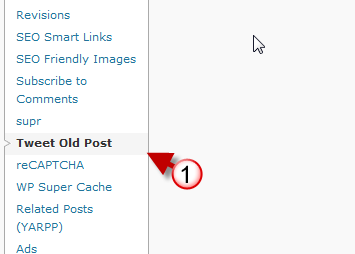
1. Go to Settings in the Admin page and click on Tweet Old Posts.

The plugin is fairly easy to configure all you need to do is enter the Twitter user name and password you wish to automatically tweet to. However if you wish to harness the power of this plugin you will need to delve in the additional options that are available.

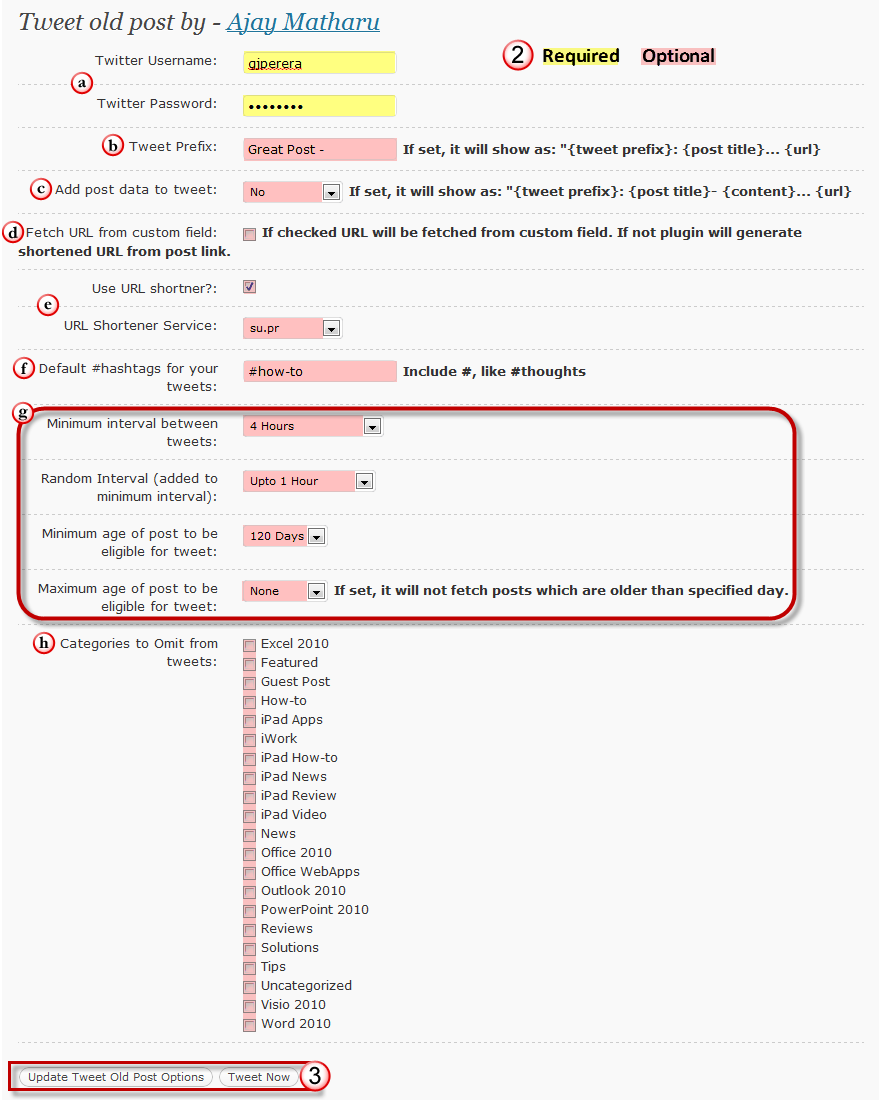
2. Set the following options.

As you can see from the screenshot above there are quite a bit of options that are available which allow you to customize how the tweets are delivered and when. We will go over each of these options in detail so that you understand each of the settings.

a. Twitter User Name and Twitter Password - As I mentioned before, you can simply enter your Twitter user name and password and start tweeting automatically right away. If you run into any issues with this plugin, most of them can be resolved by double checking that you entered the correct user name and password.

b. Tweet Prefix – If set, each tweet that is automatically generated will be prefixed with the information you enter in this box. Keep in mind the character limits and the fact that it will be used for every single tweet that is automatically generated.

c. Add post data to tweet – If set to Yes, the tweet will include additional information from the post, i.e. content. I would probably leave this set to No.

d. Fetch URL from Custom field – If checked the URL that will be used when tweeting will be from the custom field otherwise the plugin will use the shortened URL.

e. Use URL shortener and URL Shortener Service – If you decide to use a URL shortener service you can specify which one to use from the list of available services.

f. Default #hash tags for your tweets – Using this option you can specify a set of hash tags to be used with your tweets. Again, keep in mind that these tweets will be automated and the content tweeted will be random so make sure you use a hash tag that will apply to all of the content.

g. Time intervals & Eligible Post Age

  • Minimum interval between tweets – You can set the minimum amount of time in intervals between tweets. The options range from 1 hour to 168 hours (7 days).
  • Random Interval – This time interval is added to the minimum interval and it helps tweets appear a bit more natural. Options vary from 1 hour to 24 hours.
  • Minimum age of post to be eligible for tweet – This option allows you set the minimum age of the posts being tweeted. Options vary from 7 days to 365 days. It would be nice if one could enter a set number.
  • Maximum age of post to be eligible for tweet – Allows you to set the max age of the posts being tweeted. Options vary from None to 365 days.

h. Categories to Omit from Tweets – If you’ve done a really good job of categorizing your posts you will find this option a lifesaver, specifically if you use specific hash tags for certain categories.

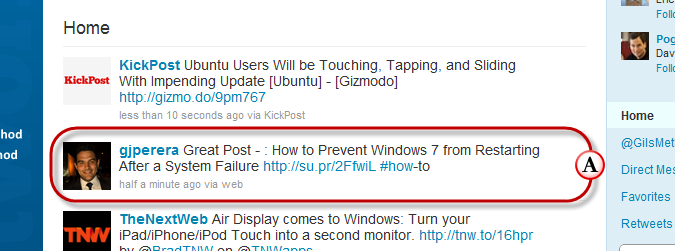
3. Once you are satisfied with the settings you will have two options; you can update the plugin settings or you can Tweet Now to make sure everything is working correctly.

The screenshot above is an example of a Tweet from an old post appearing on Twitter when the Tweet Now button was used.

As you can see by now, this plugin has a lot of options to offer and a lot of potential to drive traffic to all of those old posts on your blog. However there are some shortcomings that may make you reconsider.

  • You cannot set a custom time interval for minimum interval between tweets, random interval, minimum age of post eligibility, and max age of post eligibility.
  • You cannot omit tags from being tweeted; you have to rely on categories to filter what gets tweeted.
  • You can only use one Twitter account per installation.
  • You can only set one group of tweets at a time. For example, I would like the ability to automatically tweet certain categories with a specific set of hash tags that would differ from another group of automatic tweets based on other conditions.

Despite these shortcomings, this plugin makes should be on the top of everyone’s essential WordPress plugins list. It will help you promote older content and recycle more current content to new Twitter followers. I hope the developer is listening…If the features discussed above are added, I think that this would be a killer plugin, something I’d be willing to pay for.

What do you think? Are there other plugins with similar functions already out there? Please use the comments form below.

Source: www.weblogtoolscollection.com

Validate Your Paypal Account With Virtual Card

I get validated my account with this method. It’s like using a virtual card but free of charge. Everybody can do this. It’s valid for all country

1) Register in www.neteller.com with true information. Must match your PayPal account information.

2) Validate your Neteller account. You must send scans of ID, and one utility bill with your name and full adress. Takes one week or less to get the validation if everything is ok.

3) Once you get activated, login into your Neteller account and click on “Net+ Virtual Card” link. There you will find an option to activate the virtual card. This is usually instant if you have did everything right. You can open the “Web Version” or download the “Desktop Version”. Both are the same. Once open you’ll see this nice virtual card:

There you have the number, expiration date and CVC. The play button generates a new card, and the trash can destroys the current card. You can use it whenever you want.
NOTE: you can get a real debit card too. You can use it on ATM’s. It’s free and comes in 20 days. But be careful… it has an “inactivity fee” of $3 x month

4) Well, this is the more difficult part… How to charge your Neteller account? You have some options:

> Bank Transfer (minimun to deposit: $30)
> EverestPoker Method (minimun to deposit: $10) [Moneybookers, Paysafecard, Click2Pay]
> Whit my help (this will cost you $7)

Let’s me explain the “EverestPoker” method. This will work only if you have money on Moneybookers, Paysafecard or Click2Pay. Only works with EverestPoker because is the only poker room wich allows to deposit with one method and withfraw with another.
All you have to do is register go to www.everestpoker.com , download the room, register a real money account, and deposit $11. Then play some 10cent tables to conceal, but always let 10$ in your balance. Then request a cashout, select “Neteller” and withdraw thes $10 (is the minimun withdraw allowed). Wait 2 days, and you will get the money in your Neteller account.

However, if doesn’t want to join EverestPoker, or doesn’t have money on Monetbookers, Paysafecard or Click2Pay. I can help you sending you the $3 ($1.95 + $1) needed for Validation. You have to send me $9 to my PayPal account. Then i will send you $3 to your Neteller account. Why $9? Well… PayPal has fees, about $0.60+ for this transacition, Neteller has fees, $1 for peer to peer transfers. We have $1.60 + $3 = $4.60. The other $4.40 is what i charge you to do this transaction.
I charge you that money because i didn’t use my Neteller’s debit card for a long time, if i put money on my account, it will automatically discount me about $15 (inactivity fee for 6 months). So maybe with this i’ll be covered

5) Use the Virtual Card, get validated and PayPal will give back you $1.95

For over 4 years, Trridev Labels has provided Barcoding solutions and Barcoding equipment to a wide range of large and small companies in virtually every industry sector. Trridev Labels offers more than 10,000 brand name products and services such as Barcode Labels, Barcode Printers, Barcode Scanners, Thermal Transfer Ribbons (Wax, Wax Resin, Resin), ID Card Printers.

Contact Trridev Labelss Mfg Co – If you have requirement of  Barcode Labels, Barcode Printers , Barcode Scanners, Self Adhesive Labels, Thermal Transfer Ribbons, Printer Heads, RFID Solutions, Barcoding Solutions. We provide you a complete solutions for barcode.

OUR SOLUTIONS:
      • Barcode Labels [All Kinds of ready available stock ]
      • Barcode Printer [Zebra , Citizen , Argox , TVS, TSC , Avery , Ring ]
      • Barcode Software [Bartender , Avery ]
      • Barcode Scanners [Symbol, Honeywell ]
      • Thermal Print Head [For All Printer Models ]
      • Thermal Ribbons [ Zebra , Avery , Sony , RICOH ]
      • DATA CARD SP55 Printers

Call us at +91 – 96000 07995 / 98840 42305 To Get the Best Price Tagged with Best Quality.

Recent Posts