Showing posts with label Google. Show all posts

BING Goes Down In US Search Market

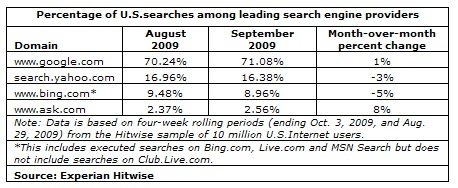
Here we have the search data for September from Experian Hitwise showing that Google accounted for 71.08% of all U.S. searches. Bing, Yahoo and Ask.com accounted for,  8.96%, 16.38%  and 2.56% respectively.

hitwisesearchdata

The search data was culled from all searches conducted for four weeks in September ending Oct. 3, 2009.

Google’s search data increased by 1% from August 2009, while both Bing and Yahoo suffered a decrease of -5% and -3% percent.

Interestingly, Ask.com’s share of  U.S. searches is a big 8% leap from its August share. And this might continue to increase especially with the Ask Deals service which Ask.com blended with its search engine.

Another interesting thing to note is the fact that despite the decrease in their search shares, combining Bing and Yahoo’s data still falls a little less than 50% of Google searches. The declining trend will certainly not help Bing and Yahoo to reach Google’s level. In addition, Bing’s data include searches made on Bing.com, Live.com and MSN Search but excluding those searches made on Club.Live.com.

Check out the SEO Tools guide at Search Engine Journal.

Google Adsense Account Banned? See here for how to get a Google Approved Adsense account with your name and address.. See this website for more details. http://googleadsenseaccount.wordpress.com/


If you enjoyed this post, make sure you subscribe to my  RSS Feeds !!

If you enjoyed this post, make sure you subscribe to my E-NewsLetter !!

Also follow me at twitter to know what I am doing.

Posted By: KirubaKaran

Microsoft Certified Technology Specialist

Make Google To Crawl Your Blog

Sitemaps, in simple English, are text files (see example) containing a list of all web pages that exist on your site. It is important that you create a comprehensive sitemap as it will help Google and other search engines crawl your site better and that might mean more traffic coming your way in the long run.

The Problem with Blogger Sitemap Files

Ideally, the sitemap file should contain all URLs of a site but if your blog is hosted on blogspot.com (or if you are using a self-hosted version of Blogger with a custom domain), you’ll be surprised to know that the default sitemap file (see example) contains only the 26 most recent pages of your blog.

That’s a bad thing because some of your older blog pages, that are missing from the system-generated sitemap file, may never get indexed in search engines. There’s however a simple solution to fix this problem.

Generate a Complete Sitemap for your Blogger Blog

Step 1: If you haven’t done this already, sign-in to your Google Webmasters account and add your blog. For details, check this video tutorial on how to add a blog to Google.

Step 2: Once your blog is added to Google, open the Sitemap Generator and type the full address of your blogspot blog (or your self-hosted Blogger blog).

submit sitemaps

Step 3: What you get is list of sitemap files that contain each and every page of your blog. You now just have to ping Google, Yahoo and Bing to inform them about these XML sitemaps.

As shown in the video screencast below, you need to manually add each of the sitemap files into your Google Webmaster Tools dashboard but for Bing or Yahoo, you can simply click blue hyperlinks and these search engines will automatically download the relevant sitemap files from your blogspot site.


Once all the Sitemaps are added, your Google Dashboard should look something like this.

sitemap added to google

If you see a red cross or an orange exclamation symbol instead of the green tick, that means something is wrong with your XML sitemap. Verify that the file exists by typing the sitemap URL in your browser.

Sometimes media enclosures (like MP3 files) in blog posts can create warnings during sitemap submission. And if you have switched from Blogger to WordPress, it still makes sense to submit sitemaps of your old Blogspot blog as that will only help search engines discover your new WordPress pages. Good luck.

Source : www.labnol.org

Google Adsense Account Banned? See here for how to get a Google Approved Adsense account with your name and address.. See this website for more details. http://googleadsenseaccount.wordpress.com/


If you enjoyed this post, make sure you subscribe to my  RSS Feeds !!

If you enjoyed this post, make sure you subscribe to my E-NewsLetter !!

Also follow me at twitter to know what I am doing.

Posted By: KirubaKaran

Microsoft Certified Technology Specialist

BING Gets More Attraction

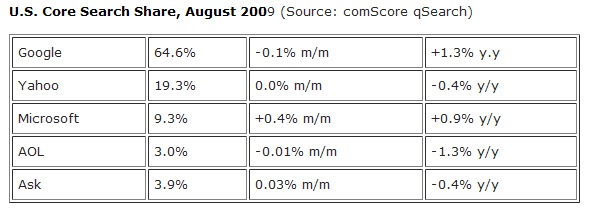
Opsie! Don’t look now but it seems that Microsoft’s $100 million marketing investment coupled with the slew of enhancements and usability features that it is introducing the past couple of months is finally reaping them rewards. And the reward comes by way of an increase of  0.4%  in their U.S. search market share for August.

uscoresearch

That figure may look small in numbers but what makes this sweet for Bing is the fact that it is the only search engine that grew in market share for August, data from comScore revealed (as reported by TechCrunch).

Google’s search query volume in the U.S. decreased by 0.1%, Yahoo’s share did not change .

If we are to add up all the increases in Bing’s search market share since its launch in May, we now have a total of 1.3%. Again it may not be that much but the important thing to note is that it is steadily gaining since then. A  few days ago, Nielsen declared Bing as the fastest growing search engine.

Should Google start worrying about this now?

Google Adsense Account Banned? See here for how to get a Google Approved Adsense account with your name and address.. See this website for more details. http://googleadsenseaccount.wordpress.com/


If you enjoyed this post, make sure you subscribe to my  RSS Feeds !!

If you enjoyed this post, make sure you subscribe to my E-NewsLetter !!

Also follow me at twitter to know what I am doing.

Posted By: KirubaKaran

Microsoft Certified Technology Specialist

New Gmail Error

Trouble grabbing your mail this morning? Google says Gmail's web interface is unavailable to an uncannily familiar "small subset of users." They officially recommend accessing Gmail through an IMAP mail client, among other ways to access Gmail when it's down.

Around 7:20am Pacific time this morning, I noticed Gmail offering a message about being unable to grab my contacts, as shown above (skinned with the Helvetimail script). A friend in Florida sent an SMS wondering what was happening at 10:40, and a few tweets and Facebook messages confirm it's at least a diverse "subset of users" having problems.

Google's Apps Status Dashboard states that an update will be issued by 8:29 Pacific time with more details, and reminds us that Gmail can still be accessed by IMAP clients, as it was the last time this happened. Need a primer on setting up your desktop or smartphone with IMAP? Here's Google's step-by-step instructions.

Share which Gmail work-arounds are working or defunct in the comments.

Google Adsense Account Banned? See here for how to get a Google Approved Adsense account with your name and address.. See this website for more details. http://googleadsenseaccount.wordpress.com/


If you enjoyed this post, make sure you subscribe to my  RSS Feeds !!

If you enjoyed this post, make sure you subscribe to my E-NewsLetter !!

Also follow me at twitter to know what I am doing.

Posted By: KirubaKaran

Microsoft Certified Technology Specialist

Google Is Searching For Beautiful Minds

It used to be that M.I.T was filled with code-breakers. Part of the movie A Beautiful Mind takes place there and in real life it’s always had close ties with the military and intelligence agencies. Tech companies also like to recruit there, and Google is no exception.

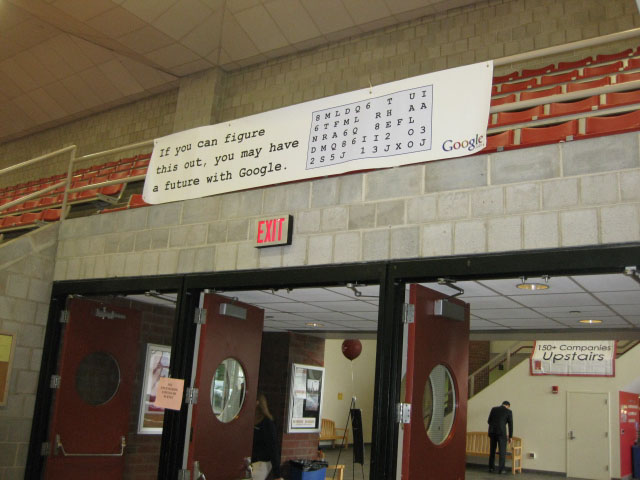
In search of some beautiful minds, Google has been putting up signs around the M.I.T campus with a code that say, “If you can figure this out, you may have a future with Google.” If they crack the code, which is a fairly simple substitution cipher (or not), it reveals a phone number where they can leave their contact information.

So far, no M.I.T. students have been able to crack the code, or at least they haven’t bothered to leave a voicemail. Maybe they need some help. The first person to crack the code gets a TechCrunch T-shirt, or maybe a job at Google if you call the number and leave your name.

google_code 029

Google Adsense Account Banned? See here for how to get a Google Approved Adsense account with your name and address.. See this website for more details. http://googleadsenseaccount.wordpress.com/


If you enjoyed this post, make sure you subscribe to my  RSS Feeds !!

If you enjoyed this post, make sure you subscribe to my E-NewsLetter !!

Also follow me at twitter to know what I am doing.

Posted By: KirubaKaran

Microsoft Certified Technology Specialist

Get A Google Approved Adsense Account Using Tampering Plug In

This Short guide is for all those members who are in need for Adsense account.
This trick would not let you down. Now you will not have to get any more Rejection from Google.
How To Approve Google Adsense Account
google adsense signup
How To Approve Google Adsense Account
Here We Go...
1. Go To Adsense.com
2. Click on Signup
3. Now Fill all the coloumns and keep the country to pakistan ( later on you can changed )
4. In City Type '' Quetta "
5. In Postal Code Type 87300
6. Click On Submit.
All Done.. Now you will get a mail from Google Adsense which will confirm your resitration...
** Now How To Change The Country And Addsress..
1. Fill this form (Click Here) Adsense Support Bin (it will take 3 days to get updated)
Some TIPS:

If You Trying by this method you can just create a blog and apply for adsense.. u will be approved in 5mins..

Recently Google had aproving Pakistan Profiles Request For Adsense And There Is Problem In Changing Your Country
So Have Found Easy Method to change Your Country Just Fllow These Steps

1.You Need Tamper data Addon To Your Firefox
2.Now Restar Your FF & Login To Your Adsense Account With Your Pass &email
3.Now Click On Edit

submit form

4.And Goto Tools And Open Tamper Data And Start It

adsense-approve

5.Now Change Your,Address,City,Pin code & Click On Save Changes Tamper Data Will Poup Window Click ON Tamper

change country

Now Here you See In Second Field PK Is Written Now Change that is Pakistan Now Change It To IN & Click On OK & Stop Tamper Data
6.Now Choose Your State

google-adsense-approval

You Have Done You Will GEt Email From Google Saying Your Country Has Been Changed.

Hope Google is aware of It. Please Take necessary actions to stop these kind of fake accounts.

Google Adsense Account Banned? See here for how to get a Google Approved Adsense account with your name and address.. See this website for more details. http://googleadsenseaccount.wordpress.com/


If you enjoyed this post, make sure you subscribe to my  RSS Feeds !!

If you enjoyed this post, make sure you subscribe to my E-NewsLetter !!

Also follow me at twitter to know what I am doing.

Posted By: KirubaKaran

Microsoft Certified Technology Specialist

Google Docs Can Covert Your Documents In 42 Languages

While most of us don't frequently find ourselves needing to translate our documents to various languages on-the-fly, Google Docs just announced a new feature that'll be great for those who do: The service now automatically translates docs in 42 different languages with a few mouse clicks.

Translating docs is a breeze: Just hit up the Tools menu, select Translate document, then choose the language you want to translate to. Docs will open the translated document in a new window, then offer to replace the original document with the translation or copy the translation to a new document. It's probably not for everyone, but it's a nice feature, nonetheless, and yet another example of Google's continued march toward integrating their various services.

Translate documents: sharing across languages and generations [Official Google Blog]

Google Adsense Account Banned? See here for how to get a Google Approved Adsense account with your name and address.. See this website for more details. http://googleadsenseaccount.wordpress.com/


If you enjoyed this post, make sure you subscribe to my  RSS Feeds !!

If you enjoyed this post, make sure you subscribe to my E-NewsLetter !!

Also follow me at twitter to know what I am doing.

Posted By: KirubaKaran

Microsoft Certified Technology Specialist

Search Engines Are Updated After BING’s Release

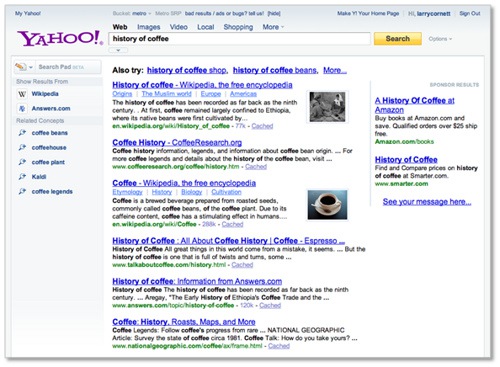
Interestingly, just when the Yahoo-Microsoft deal is a few months from materializing, here comes Yahoo telling us all what the Yahoo search engineers have been doing to give us a better Yahoo seach experience. First of  these enhancements is the new Yahoo search page design which according to a post on the Yahoo Search Blog “will make search more personally relevant and helps people explore things that matter most to them.” I have no idea what took Yahoo this long to make this enhancements and why it is doing all of these only now. Probably to tell us that with or without the Microsoft search deal, Yahoo is still a separate web entity.

newyahoosearch

So here are the new things that have been rolled out/will be rolled out on Yahoo Search:

  • A more unified search page design that realigns with the new Yahoo Home Page rolled out recently.
  • Easier access to various Yahoo search features including Search Pad, Search Scan and Safe Search
  • Addition of  ”Related Concepts” or what we usually refer to as “Related searches” in the search assist layer
  • Richer search results from more sites such as Wikipedia

These enhancements are being tested out to selected percentage of U.S. users.  It might take some more time before you can see it live.

Google Adsense Account Banned? See here for how to get a Google Approved Adsense account with your name and address.. See this website for more details. http://googleadsenseaccount.wordpress.com/


If you enjoyed this post, make sure you subscribe to my  RSS Feeds !!

If you enjoyed this post, make sure you subscribe to my E-NewsLetter !!

Also follow me at twitter to know what I am doing.

Posted By: KirubaKaran

Microsoft Certified Technology Specialist

New Google Ad Placement

Does Google’s search results page feel a little more crowded to you? The ads which used to run down along the right-hand edge of the page are now shifted over to the left, as if to declare, “Hey, look at us!” Maybe this will increase the number of times ads are clicked on. They are certainly more noticeable.

The ads now seem like they are now grouped together with the organic results, whereas before they were shunted off to the side (a legacy of the early days of Google when the purity of organic results was protected as much as possible from being sullied by dirty ads). In fact, on my screen the ads take center stage, with a thin line down the middle forming the slimmest barrier separating them from the natural results. I wonder if this design change has something to do with the popularity of wider screens. But the line and central placement of the ads also conveniently draw the eye.

Is that what is most important now to Google? Don’t bother your mind with such silly questions. Google needs more clicks, and it shall have them.

Update A Google spokesperson confirms that it is always “experimenting with new visual representations” and that it “shifted the ads to the left on the page as a way to help users find what they are looking for on the Internet.” See, it’s for your own good. You were looking for the ads the whole time.

Source: CrunchGear


If you enjoyed this post, make sure you subscribe to my  RSS Feeds !!

If you enjoyed this post, make sure you subscribe to my E-NewsLetter !!

Also follow me at twitter to know what I am doing.

Posted By: KirubaKaran
Microsoft Certified Technology Specialist

Block A Follower Of Your Blog

Some time ago, when the 'Follower' gadget was all new and exciting, I tried to cover a few aspects of using it - one of which was Blocking a Follower.

Things get changed, or updated, to make them better, or more streamlined. Thus was the case with Blocking a Follower. The result is the same, but the method slightly different.

To Block a Follower (for whatever reason) is as simple as:-

  • Go to your Dashboard
  • Click on 'Followers'
  • Click on the Image of the offending Follower
  • Click the option to Block
  • Block
  • Done
    ... see the following images -


    Simple ah .. !

If you enjoyed this post, make sure you subscribe to my  RSS Feeds !!

If you enjoyed this post, make sure you subscribe to my E-NewsLetter !!

Also follow me at twitter to know what I am doing.

Posted By: KirubaKaran
Microsoft Certified Technology Specialist

Google Earth Gets Data More Than SPY Satellite

The leader of Pakistan’s Taliban, Baitullah Mehsud, may or may not be dead after a CIA missile hits his father-in-law’s home in the remote “Zangarha area” of the country. But now we can see exactly where that missile hit, and we don’t even need access to a spy satellite. Thanks to Google Earth, we get the image above.

Stefan Geens pinpointed the location on his blog Ogle Earth using location information gathered from news accounts. He also figured out where the supposed burial ground was. A decade ago, only a handful of people would have had access to such satellite imagery. Today, anyone can download it for free. CIA and military satellites are still higher resolution, but it makes you wonder how fast the geo-information gap between governments and citizens is closing.

We’ve also seen recently how the Untied States Holocaust Memorial Museum is using Google Earth to graphically document the ongoing genocide in Darfur. It is becoming increasingly more difficult to hide from Google Earth, which makes us all Big Brother in a sense. That’s a good thing (better us than a single government or corporation).

Unfortunately, Google Earth is only retrospective. You can’t see what is happening across the globe right now. Maybe one dayit will be closer to real time.

Source:: MobileCrunch


If you enjoyed this post, make sure you subscribe to my  RSS Feeds !!

If you enjoyed this post, make sure you subscribe to my E-NewsLetter !!

Also follow me at twitter to know what I am doing.

Posted By: KirubaKaran
Microsoft Certified Technology Specialist

Now Gtalk as an feature of AutoReplying..

As many of you are aware, I was not much into online activities since quite long time because of my academic exams and as such, I always needed something that will help me out conveying this message to as many people with minimum efforts. Setting auto replies in my Gtalk account was one of the best way of letting my friends know about my activities and then I found various ways of setting automated replies for my Gtalk friends that I am going to discuss here in this post.Ways to set auto reply:

I will now, one by one, discuss all the above 3 tricks and let you know the ways of using them

Digsby:

digsby I guess, many of you must have used Digsby at least once. Digsby is one of the most used Gtalk client that even supports many other IM networks, and it is also in the recommended list of apps here on Devils workshop. So how one can set auto reply using Digsby? Just follow steps after downloading and installing Digsby onto your computer:

  1. As shown on the screenshot below, right click on the tray icon of Digsby (of course after installing it) and go to preferences
    digsby1

  2. Go to status tab and check “Auto respond with status message” option
    digsby2

  3. Now whenever you set your status message with ‘Busy’ status, then any one who pings you will get a reply with the message you had earlier set as your status.
    digsyby4

And here is how, if any one who pings you will be auto responded with your predefined status message:

digsby3

This is one of the best trick to auto reply, but the only disadvantage in it is, your computer will have to be always switched on to auto reply with digsby running to auto respond. But there’s another service that we will discuss next, using which, you can set auto reply and it doesn’t matter whether your computer is switched on or not! ;-)

Answer.IM

answer.im

This is the another method to auto reply your Gtalk contacts, in fact this could be the best auto responding tool, if you want your Gtalk account to respond with a pre-defined message even when your computer is turned off. Also, for using this auto responder, you need not download any software onto your PC. Just login to answer.im and give your Gtalk login credentials to start using this auto responder service.

For setting up auto response in Answer.IM, have a look on our previous post: Answer.Im: Answering Machine for your Instant Messengers!

Gtalk Auto reply tool

Another tool is Gtalk auto reply software that works similar to Digsby though, unlike digsby, it doesn’t have support for chatting with online friends. You need to download and install the client on your system and it will keep responding to your friends automatically whenever they pings you. You can get this tool here.

Which tool is best for you?

Well, I prefer using both of them (Digsby and Answer.im) and unfortunately I could not make the third tool working on my system (many of my fellow bloggers could use it successfully though). You may use either of the tool depending on your situation. If you like your IM accounts to auto respond for 24×7 then you may try answer.im else digsby is a great tool too!

Links: Digsby download | Answer.Im | Gtalk auto reply software download

Related reading: Answer.Im: Answering Machine for your Instant Messengers!


If you enjoyed this post, make sure you subscribe to my  RSS Feeds !!

If you enjoyed this post, make sure you subscribe to my E-NewsLetter !!

Also follow me at twitter to know what I am doing.

Posted By: KirubaKaran
Microsoft Certified Technology Specialist

Google Earth Brings Moon Much Closer

mooninearth

In celebration of 40th anniversary of the Apollo landing on the Moon, Google is launching a new feature of Google Earth and it happens to be the Moon.  Moon in Earth features various Apollo 11 stories straight out of the many books that chronicles the event told in an interactive 3D medium using Google Earth.

The new Google Earth feature chronicles each of the Apollo landing missions through pictures and stories as well as video footage from Spacecraft films and surface panoramas of photos taken by the Apollo 11 mission crew themselves 40 years ago.

There is also the Human Artifacts layer which contains locations and trivia on all spacecrafts that landed or crashed into the moon.

Moon in Earth also features Historical Maps layer of maps used by NASA during the Apollo missions.

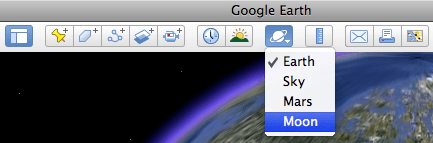
Moon in Earth requires installation of Google Earth 5.0.  If you have it installed you can click on the planet button on the top of the toolbar of Google Earth, choose Moon and then let Google fly you to the moon.

Source : Search Engine Journal.


If you enjoyed this post, make sure you subscribe to my  RSS Feeds !!

If you enjoyed this post, make sure you subscribe to my E-NewsLetter !!

Also follow me at twitter to know what I am doing.

Posted By: KirubaKaran
Microsoft Certified Technology Specialist

Watch Videos On You Tube Without Ads

Recently I have been watching YouTube movies but the annoying thing is the ads which pop up inside the video. Sometime there are also comments on the video which is more irritating. But there is a Solution to remove the ads and comments in the Youtube videos.

Watch Youtube Videos without Annoying Ads

Quietube: Video without the distractions

To watch web videos without the comments and crap, just drag the button below to your browser’s bookmarks bar. On any of the supported video pages, click the bookmark button to watch in peace. You can then make short URLs too, to send the quietube version to your friends. Easy as.[Source]

They support YouTube, BBC iPlayer, Viddler, and Vimeo, with more to come…quietube or use this Greasemonkey Script 


If you enjoyed this post, make sure you subscribe to my  RSS Feeds !!

If you enjoyed this post, make sure you subscribe to my E-NewsLetter !!

Also follow me at twitter to know what I am doing.

Posted By: KirubaKaran
Microsoft Certified Technology Specialist

You Tube Will Not Open On IE6

Judging by this screenshot taken by an IE6 user who was watching some videos on YouTube, it appears the Google company will be phasing out support for the browser shortly. I don’t have Internet Explorer 6 installed on my computer, so I can’t verify this first hand, but illogical it seems not and a simple Twitter search shows multiple people confirming the news. Heck, some are even downright ecstatic over the news.

The online video behemoth is pointing to ‘modern’ browsers like Google Chrome (twice on the same page even, unsurprisingly), Internet Explorer 8 and Firefox 3.5 as alternatives.

With the impending move, YouTube follows in the footsteps of that other Web 2.0 poster child, Digg, which recently hinted at wanting to cut support for the browser too. Digg’s User Experience Architect Mark Trammell at the time wrote that the site is strongly considering removing essential features like digging and commenting for IE6 users. He explained that while IE6 users make up around 5% of site traffic, it only accounts for 1% of diggs, buries, and comments.

YouTube so far hasn’t officially communicated about the desire to drop support for IE6, but it’s conceivable that like Digg it would rather have its developers spend time optimizing the service for newer, better browsers than wasting man hours on the oft-despised Microsoft browser. We recently reported that Internet Explorer is losing market share to Firefox and Safari at a rapid pace.

(Thanks to www.Techcrunch.com for the tip)


If you enjoyed this post, make sure you subscribe to my  RSS Feeds !!

If you enjoyed this post, make sure you subscribe to my E-NewsLetter !!

Also follow me at twitter to know what I am doing.

Posted By: KirubaKaran
Microsoft Certified Technology Specialist

Google Is A Kid When Compared To The Giant Microsoft In The Aspect Of OS

By now you must have read about today’s biggest news - Google Chrome OS. The Official Google Blog just broke the news, Google Chrome is about to give birth to a full blown Operating System

By virtue of its name - Google Chrome OS  will be built on the Chrome architecture. It’s just like running Google Chrome on a computer, or to be more specific on netbook  minus Windows XP.

Google specifically describes the Chrome OS as:

Google Chrome running within a new windowing system on top of a Linux kernel.

It’s going to be a lightweight and open-source operating system. This would lighten Google’s load in developing it while at the same time making the OS popular even before its launch. Also, this would enable developers to get into the rush of building their applications that will run on the Chrome OS. These are in addition to Google’s web-based products and services which should normally be supported by the said OS.

Google Chrome OS will be available on several netbooks sometime in 2010. But its source code will be made available later this year.

Now the big question is - Why build a new OS for netbooks instead of developing the already available Google Android mobile platform? Google has this for an answer:

Google Chrome OS is a new project, separate from Android. Android was designed from the beginning to work across a variety of devices from phones to set-top boxes to netbooks. Google Chrome OS is being created for people who spend most of their time on the web, and is being designed to power computers ranging from small netbooks to full-size desktop systems. While there are areas where Google Chrome OS and Android overlap, we believe choice will drive innovation for the benefit of everyone, including Google.

So netbooks will just be the test bed. The real objective here is for Google Chrome OS  to run on both netbooks and desktop systems.

Next big question - Will it be a Windows XP  killer? Probably not.  Only Microsoft can kill Windows XP, and that would happen as soon a Windows 7 becomes successful. Google Chrome OS is a Windows 7 rival, the same way that Google Chrome is a rival of IE. Now that’s a better way of looking at it.

Check out the SEO Tools guide at Search Engine Journal.


If you enjoyed this post, make sure you subscribe to my  RSS Feeds !!

If you enjoyed this post, make sure you subscribe to my E-NewsLetter !!

Also follow me at twitter to know what I am doing.

Posted By: KirubaKaran
Microsoft Certified Technology Specialist

Please Protect Your Google Adsense Account…

Google Adsense, as we know, is the pioneer of content-related advertising, using bloggers, small-time business or any website (that gets approved!) as advertising estate. Their revenue system helps many people get online and earn a little dough.. The ads come from another Google service called Adwords, where advertisers just create ads and set of on campaigning. However, all this automated behavior by Google is bound to create bloopers!

Take for example, during the 26 Dec Mumbai shooting, the following ad was reported by notesfromearth on IBNlive (newportal):

Terrorism Anyone?
Terrorism Anyone?

Another weird ad, that came out due to the automated and non-reviewing nature of Adsense is seen below. This ad came in my Gmail account, when I was reading about Photoshop.

Qulity. Oh Yeah!
High qulity. Oh Yeah!

I’d have to say that this ad had no relation to the content I was reading, and the ad had no meaning or clarity itself!

Another one came in the Adsense dashboard of the author of Hoover Web Design Blog.

WTF!
WTF!

Here is another funny one from geckoandfly.com

Let me know what Google says!?

Not saying anything against Google. It’s one of the best tools on the web that helps us earn money. However, a little rectification of that famous code could improve it. What say?

Source : .www.devilsworkshop.org


If you enjoyed this post, make sure you subscribe to my  RSS Feeds !!

If you enjoyed this post, make sure you subscribe to my E-NewsLetter !!

Posted By: KirubaKaran
Microsoft Certified Technology Specialist

Ebay Too Dangerous For Adsense Accounts

ebay adsense"AdSense - the hottest way to earn money on internet at the moment" - says one auction. Ebay is flooded with such auctions of Adsense eBooks and Videos, Adsense Ready Websites and Templates that promise you Instant Adsense Cash without any efforts or sometimes even without a website.

I won't comment if any of the Adsense books or videos would help in improving Adsense earning, but there are some more risky Adsense related goods on ebay that may actually get you banned from the Google Adsense program.

Here are some Adsense auctions on eBay that may not be safe:

Google AdSense Toolbar 1.0 : Get 1000'S of Legal Clicks Daily to your Adsense Ads! The Adsense Toolbar is the best solution to make a large amount of money from Adsense for Search without paying expensive advertisement or traffic costs. [$25]

Adsense Web site which makes me $40,000 Per Month : Own a copy of my website which earns me over $40,000 per month. [$127]

Guaranteed Unlimited Legal Adsense/PPC Clicks : This is a very simple system, even a child can do it. I will setup your system for you and just tell what to do. This sytem applies to all web-sites having PPC contextual advertisements even from Yahoo, VMP, Clicksor, BidVertiser, Adbrite, BannerBoxes.

$ Traffic & Banner Clicktool Adsense Advertising Cash $ : This tool uses proxy servers to click Adsense ads or other affiliate banner ads for you. According to description, you simply can enter an Internet address into the corresponding text field, you enter the number of the desired Clicks and Timeinterval between the clicks. After the start the clickMaster1.1 takes care of the clicks for you. [$1.25]

Blog & Ping Automator, Make Huge Adsense Profits! - This software goes out and gets the very best content—either from the internet or from your site—and posts the first portion of each article into a blog entry. Visitors come, they click on the ads, Google AdSense sends you huge checks.

Adsense Toolbar the Original - The Adsense Toolbar does emergency only increase your surf comfort into the Internet through selected ADDS Ons, but it offers tons you additionally leases three outstanding features in itself, which are unique for today's Toolbars, worldwide.

Apply your brains and stay clear of such products which promise to make you a Adsense millionaire overnight.

The only thing that works is Original Content and good relationships with fellow bloggers and readers - rest all will follow automatically.

Source : www.labnol.org


If you enjoyed this post, make sure you subscribe to my  RSS Feeds !!

If you enjoyed this post, make sure you subscribe to my E-NewsLetter !!

Posted By: KirubaKaran
Microsoft Certified Technology Specialist

“Scared Google” Highlights Verticals with Explore Search Page To Fight Back BING

So finally, Google does something to fight back at the mileage that Microsoft’s Bing has been receiving lately.  Nothing fancy on the part of Google really. Just some plain old search verticals which are now being presented in a more organized manner through the Explore Google Search Page.

microsoft vs google

What’s interesting about this special Google page is a brief tagline on what it is. The tagline goes:

Search is at the heart of everything we do at Google. Our engineers work every day to solve the hardest search problems, and thus improve your online experience. Here’s a glimpse at what they do, the features they’ve built and the remarkable user stories that inspire our work.

Take it however way you want, but we can’t escape the fact that intentionally or unintentionally this is Google’s first step towards reengineering its search vertical products and of course Google’s baby steps towards preventing  Bing from expanding its user base further.

Anyway, going back to the Explore Google Search, the page list down various search verticals that Google already has. Leading these search products are Google’s  - Weather, Flight Tracker, Local Business and other search services. The page includes the respective products’ search boxes, you can immediately try out the services right on the Explore Google Search page.

The page also highlights search stories and the Google engineers.

Another Important fact is Microsoft BING attains a stability in its growth, In the first week of its release it as 9% of the users and in second week 11% and now in the third week its as 13% of the web search usage. Seriously yahoo has got enough head ache with the Microsoft BING and the pressure is being realized by the Google now.


If you enjoyed this post, make sure you subscribe to my  RSS Feeds !!

If you enjoyed this post, make sure you subscribe to my E-NewsLetter !!

Posted By: KirubaKaran
Microsoft Certified Technology Specialist

Google Mining Your Adsense Account

google-thumb1

If you have a blog or a website with a Google adsense account, please read this, it will be a much better instructions that may keep your adsense account with out getting banned.

I am not sure whether the minnows like Bi-advertiser,Chitika or Ad-Brite are this much efficient. But Google does. Remember that you are playing with Google, which tracks down everything about your blog. Simply, Google is data mining your blog.

google-adsenseStill thinking to cheat AdSense? Stop that. It will never bring you anywhere. You might pull it off with smaller ads network, but definitely not with Google. Here are some detection methods they might use. At the very least, they have the resources to do so.

Cookies

Most home users do not use static IP Address for Internet connection. In most cases just disconnect and reconnect will give you a new IP Address. But don't forget, Google has set cookies on your computer.
Other Google Services

Thinking that you are safe just because you do not access your AdSense account? Think again. This time, consider these: Gmail, Google Earth, Google Calendar, Google Search, Google Toolbar, Google Talk, Google Sitemap, Google Desktop, Blogger, and so on, and so on. With the wide range of services they provide, Google can trace the originator of most (or probably almost all) clicks.

IP Address

If the AdSense click is originated from the same IP Address as the one used for accessing your AdSense account, your account is flagged.

Click Pattern 1

Oh, why this computer / IP address / person is so trigger-click-happy on this particular website but never click on the ads on other sites?

Click Pattern 2

And why is it that people accessing these sites direct (type-in URL or from bookmark) tend to be very active ad-clickers compared with those referred from search engine or other sites?

Click Pattern 3

And why the ad-clickers like to hit and run, compared with non ad-clickers that surf a few pages before leaving?

Click-Through-Rate (CTR)

Your CTR may range from 0.5% to 10%, but if it exceeds a certain point (probably around 10%), you are flagged.

Geo-Location

Used Urchin (Google Analytics) before? Then you should know that Google can trace traffics origin down to the small town. Different IP doesn't mean much. Unless you site is really targeted to one small geo-point, a high number of clicks from nearby location will get you banned quickly.

Webpage design

How about the click here or support us? Google has the best search engine in the world. Is it really that hard to find those words?

Advertisers conversion rate

Ad click is one thing. But does it bring value to the advertisers? If none of the clicks on your site translate to conversion to the advertiser, you are in trouble. First the Smart-Pricing hits, then your AdSense account disabled.

Hardware address?

MAC address of the LAN card, modem, and router works almost like a fingerprint. I'm not sure if Google can track this, but probably they do. They have rocket scientist, remember?

Combo

Each of these detection methods might seem rather weak. But combine them together, and not many click-fraud can pass-through these filters. Even the smartest click bot will have a hard time.
In short, it is almost impossible to cheat AdSense in the long term. Instead of spending time, money, and effort trying to outsmart Google, try these tips to improve your AdSense earning.[VIA]


If you enjoyed this post, make sure you subscribe to my  RSS Feeds !!

If you enjoyed this post, make sure you subscribe to my E-NewsLetter !!

Posted By: KirubaKaran
Microsoft Certified Technology Specialist