Showing posts with label Internet security and privacy. Show all posts

Are You A Twitter? Then Keep A Eye Over Your Tweet

You are running a site and you want to know all those people who are linking to your site and are constantly tweeting your website. With BackTweets you can easily monitor all those who are linking to your site. How can these be helpful to you ?

backtweets

Well here are the answers :

  • Connect With Your Fans: Now if you know who are the ones who are tweeting your posts, you can easily start building a relations with them. Connecting with your fans is the most important step i the success of your site.
  • Monitor Your Posts : You can easily monitor your posts and optimize them. If you know all the hit topics of your site, then you should start concentrating on that particular topic theme.
  • Ability To Search Keywords : With an ability to search for keywords, one can easily see if the topic that he is going to post is already tweeted or not.

BackTweets is developed by BackType which is a conversational search engine and index and connect millions of conversations from blogs, social networks and other social media so people can find, follow and share comments. BackType was founded in June, 2008 by Christopher Golda and Michael Montano.


If you enjoyed this post, make sure you subscribe to my  RSS Feeds !!

If you enjoyed this post, make sure you subscribe to my E-NewsLetter !!

Also follow me at twitter to know what I am doing.

Posted By: KirubaKaran
Microsoft Certified Technology Specialist

How To Check Your Internet Speed

There are many sites to check your Internet connection (Broadband) speed but many of them don’t provide accurate results.

I’ve found a site testmy.net, which aims to provide most accurate results for your Internet bandwidth speed test. It is very fast and simple to use.

Speed test results

Test Download Speed: http://testmy.net/speedtest/download_broadband_test.php

Test Upload Speed: http://testmy.net/speedtest/upload_broadband_test.php

Run a download & upload speed test together: Start Dual Test

You can also share your speed score using the HTML code as shown below:

speed score

NOTE: If you have download accelerators running, please turn them OFF before testing.

Source : www.webtrickz.com


If you enjoyed this post, make sure you subscribe to my  RSS Feeds !!

If you enjoyed this post, make sure you subscribe to my E-NewsLetter !!

Also follow me at twitter to know what I am doing.

Posted By: KirubaKaran
Microsoft Certified Technology Specialist

How To Use A VPN Network To Access Blocked Site

Most of the proxy websites are vulnerable to security risks as they are not SSL secured and as open to the service providers.Proxy websites just only acts as a mediator between us and the target website or service . Where as VPN ( Virtual private networks ) operated in a secured medium .VPN services first encrypts our data and associates a custom key or wrapper and then transfer over internet . The data is then decrypted at the end of the VPN end point and transferred to the web service . So in between this transfer none will be knowing your personal details , and you will get all benefits of using a proxy . So by using VPN services we can hide our IP ,login username ,password ,credit card information etc in an extra secured environment .Also you can use VPN services to fool ISPs and bans employed by countries to particular websites . the  There are both payed and free Virtual Private networks . Here we have collected few free VPN networks that you may use for accessing private services  .

These free VPN services will have some limitations on download limits ,bandwidth etc. But they are good if you looking only for browsing purposes . aloneweb free vpn services
ALONWEB free VPN service: Complete registration , download and install Alonweb OpenVPN client for Windows. After instillation click on icon from system try and connect  Enter username and password registered with service .

connect to aloneweb VPN


Now VPN will be established. ALONEWEB will now let the user to surf anonymously and download by bypassing country and ISP firewalls . But free service is limited to 1GB monthly traffic share .
Loki free VPN service : Loki is yet another free and SSL secured VPN service for Windows OS . Here you don't any site registration to access VPN service . A guest role is enough to use there VPN servers located at different parts of the world .

Loki free VPN service

Download Loki VPN client and install . Similar to that in ALONEWEB VPN , click on connect button and establish a secured connection to access blocked websites on a secured mode .


If you enjoyed this post, make sure you subscribe to my  RSS Feeds !!

If you enjoyed this post, make sure you subscribe to my E-NewsLetter !!

Also follow me at twitter to know what I am doing.

Posted By: KirubaKaran
Microsoft Certified Technology Specialist

Free Anti Virus For USB Drive

Having a USB Pen drive is good for productivity because it can carry large files despites its small size. With capacity more than 8gb and fast write/copy speed, this invention has become one of the most needed computer devices for students, workers, teachers, and others to manage their digital files nowadays.

However, with the heavy usage of USB pen drive a major problem arises. Virus creators turn their attention towards this tiny device to exploit unsecured computers. Many viruses infect the pen drives and of course inclusive of the PC where it is plugged in which has Microsoft Windows operating system installed. It is made possible due to the compromised autorun.inf script file which automatically execute in company with viruses files whenever the device containing the file is plugged into Windows-based computer. Windows operating system does not disable autorun by default.

To counter this problem, there are several methods that one can use. First is to enable write protect on USB flash drive which is useful if you plan not to do any change to your USB flash drive. There’s also viruses and malware removal tool by USB’s which comes in handy. But today I’m going to cover about free standalone antivirus solution which consists of both prevention and cure approaches.

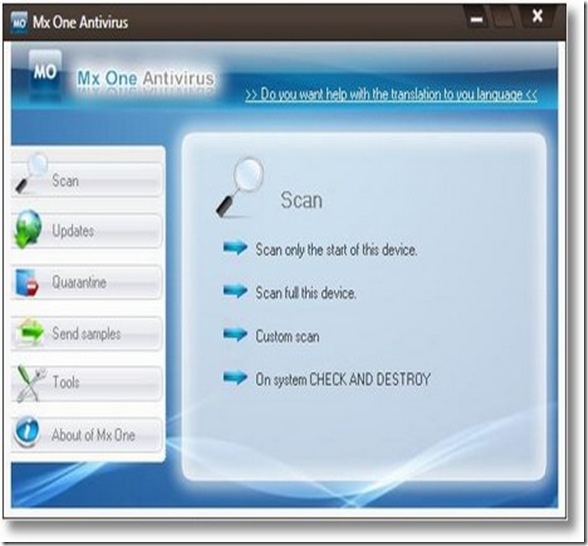
mxone-Usb Ani Virus

Mx One Antivirus 4.0 is a free antivirus for your USB pen drive, iPod, mp4 and mp3 players, memoirs M2, SD, micro SD, and many more USB-based storage devices. It protects your USB drives against virus, trojans, worms, spyware, hacking tools, and software risks. It also quarantines suspicious and infected files for deletion purpose.

The installation file is 1.4 mb. You need roughly 1mb of free space reserved on your PC or removable media for this software. You can install either into your PC or your USB flash drive or both better protection.

With this free antivirus for pen drive the question that comes in one’s mind would probably if this antivirus gets to work well with antivirus that is already installed in our pc? Fortunately, it is compatible with any antivirus resident like Nod 32, Kaspersky, Bit Defender, AVG, Norton, Panda, Avast, Avira Antivir.

The key aspect of Mx One Antivirus 4.0 is it provides real-time protection. Check and Destroy system detects and removes all viruses that attempt to infect our USB device while connected to infected PC even for unknown viruses. On the other hand, Guardian system protects our PC from viruses that come from infected USB devices. Always update the signature file periodically to prevent new virus threat.

Download Mx One Antivirus 4.0 (1.4mb, zipped) |

If you enjoyed this post, make sure you subscribe to my  RSS Feeds !!

If you enjoyed this post, make sure you subscribe to my E-NewsLetter !!

Posted By: KirubaKaran
Microsoft Certified Professional

Out of IP addresses!

By 2011, India will run out of Internet Protocol addresses! Business Standard reports that the Internet Assigned Numbers Authority (IANA) had 4.3 billion IP version 4 (IPv4) addresses of which, 68% have already been allocated and 13% are unavailable due to technical issues.

Although the internet penetration in India is low, the web in the country is running out of the Internet Protocol addresses. The Internet Assigned Numbers Authority (IANA) had 4.3 billion IP version 4 (IPv4) addresses of which, 68 percent have already been allocated and 13 percent are unavailable due to technical issues.

The Indian IT industry is yet to gear up for the IP version upgrade. Sify Technologies, Reliance Communications (RCom) and Bharti Airtel are some of the ISPs working on this front. "The important thing is to create awareness among Internet Service Providers (ISPs) on the need to migrate to the new format. A lot of work has to be done, like configuring systems and putting equipment in place that supports the new format," says P K Saji, Senior Vice President (Global Infrastructure Operations), Sify Technologies. He also points out that a further delay would make it difficult for ISPs and enterprise users to seamlessly migrate to IPv6.

What is an IP address?

  • A numerical identification of a company’s name that the web understands.
  • Used to trace the origin of an email, malicious worms or location of a defamatory website or blog

What is IPv6?

IP version 6 (IPv6) is the next version that supports a total of 16 billion IP addresses

The Telecom Regulatory Authority of India (TRAI) urged the Department of Telecommunications (DoT) that:

“The fast growth of Internet and likely migration towards NGN (next generation networks) will require IPv6 addresses. In this background, the creation of a National Internet Registry (NIR) is urgently required”.

The roadmap ahead

  • The Indian IT industry, however, is yet to acknowledge the need for IPv6.
  • It is very important for TRAI to create awareness about this among ISPs.

The migration could prove fatal unless there is a proper migration process in place. The Indian IT industry is yet to gear up for this migration. A whole lot of systems need to be configured and equipment needs to be put in place supporting IPv6.

(Source: Business Standard)

If you enjoyed this post, make sure you subscribe to my  RSS Feeds !!

If you enjoyed this post, make sure you subscribe to my E-NewsLetter !!

Posted By: KirubaKaran
Microsoft Certified Professional

Advice For Creating Secure Password

We’ve all heard the advice before. When picking a password be sure to not choose a word from the dictionary, make sure to use letters, numbers and symbols and never use the same password for multiple items.

password

All in all, it’s good advice, but the realities of the Web are much more complicated than that. If we could all remember a string of garbled text for every site we visit, our online lives would likely be much more secure. But as humans we are fallible and, as such, we forget, we take shortcuts and we inadvertently create worse security problems.

The truth is that most “hacks” that take place on blogs and any personal account are not caused by any software vulnerability, but through either password guessing or phishing. As such, the best security step anyone can take is to ensure that you have strong passwords and that you guard them closely.

But that is something much easier said than done. So here are some practical suggestions for creating strong passwords and making them stick.

Build a Good Password

The key to building a good password is to start with something you know and build off of it. For example, start with the word “orange” in the example below and then munge it to add extra security:

  1. Base Word: orange
  2. Add Numbers: o7ran3ge
  3. Add Capitalization: O7ran3Ge
  4. Add Symbols: O7r+n3G=

The above password, according to Microsoft’s Password Checker is “Strong” and can be easily made “Best” by adding six additional characters, perhaps by including another word. However, since not all sites or services allow more than 8-10 characters in their passwords, it is important to start with a shorter one that is secure and expand it if desired.

This creates a password that, with very little effort, can be memorized and reused while still being very secure. Though passwords created this way are not perfect, this is because they are not completely random, they are more secure than jotting down passwords or having to routinely use “forgotten password” features on sites.

Create Different Passwords

Once you’ve created a highly secure password, it is important to create variations of it. The reason is two-fold. First, using the same password on multiple sites creates a security risk. Second, even if you are comfortable using your password at multiple locations, not all sites will allow you to use symbols or capitalization in your password, essentially forcing you to pick a weaker password.

There are two easy ways to do this, the first is having different levels of security for the sites you visits. For example, your banking account should have the highest level of security, meaning the final password, but a forum you join might not be as important so you could use one of the weaker passwords, such as “O7ran3Ge”. However, it is important to change it so that one with that password could not make a guess at your more secure one, so you may choose “OranGe73″ instead to keep it memorable.

You can also have a “throw away” password for sites you do not trust and do not plan to give any important information to, such as a blog you are visiting just once. These passwords can be very insecure but still should not be easily guessable. For these, a pet’s name or a pattern of keys on the keyboard may make sense.

Variations on a Theme

An even more secure suggestion for creating multiple passwords is to base each password on the site you are visiting. For example, if you were to log into this site, you might begin with the first four letters in the domain.

  1. Base characters: blog
  2. Shift the Letters One Left on the Keyboard: vkif
  3. Add Numbers: 1vkif3
  4. Add Capitalization: 1VlIg3
  5. Add Symbols: 1V+kIf3%

If you can remember the pattern of how the password is created, you can easily create custom passwords for every site you register for and no two sites will have the same password. (unless they have a similar domain). Best of all, the system degrades well. If a site doesn’t allow non alpha-numeric characters, you stop at the third step.

The problem with this system is that it might slow you down, especially on sites you don’t visit a great deal as you will have to work backwards to “figure out” the password rather than simply remember it. Still, it may be a small price to pay for security.

Add a Second Layer

However, even better than building a better password is adding a second layer of authentication. This adds a layer of protection beyond what you can remember (or figure out) and connects your accounts with something that you have on your person. This also adds a layer of protection should your password be phished or otherwise stolen.

A good example of this is the PayPal Security Key. This allows you to choose between either using a keychain, which displays a series of six ever-changing numbers, or receiving text messages on your cell phone.

You can also use the keychain with Verisign’s Personal Identity Provider (PIP) service. This lets you log into sites that accept OpenID. This includes an increasingly large number of sites. You can even install a WordPress plugin that allows you to login with your OpenID, thus letting you use your keychain with your own site.

However, there are many systems that allow you to have two factors of authentication and many banks require one of them. Which factor you choose will ultimately come down to what your current service accepts, as frustrating as that is.

Bottom Line

In the end, there’s no magic bullet to good password protection. You just have to use solid, easy-to-remember passwords and be careful who you give them out to. Be smart with your passwords, practice good security on your computer and you will likely be fine.

However, one final suggestion, for those that want the most secure passwords possible, take a look at the Perfect Passwords system at GRC.com and, while you’re at the site, check out the Security Now! podcast, which a great resource for security-related issues.

it is also where many of these suggestions came from.

However, passwords aren’t rocket science, they just take a little bit of planning and a willingness to trade convenience for security, at least a little bit.

If you enjoyed this post, make sure you subscribe to my  RSS Feeds !!

If you enjoyed this post, make sure you subscribe to my E-NewsLetter !!

Posted By: KirubaKaran
Microsoft Certified Professional

Windows 7 tightens security for USB drives

In the wake of the Conficker worm spreading via removable storage devices among other methods, Microsoft said on Tuesday it is making a change to the way Windows 7 handles USB drives.

As a result of the change, most USB drives will not be able to automatically launch a program using a Windows feature known as AutoRun, Microsoft said in a post on its Security Research & Defense Blog.

So, if an infected USB drive is inserted on a machine then the AutoRun task will not be displayed, Microsoft said.

Fixed removable media, such as CDs and DVDs will still be able to use AutoRun. Also, some specialized "smart" USB flash drives such as those containing U3 software will still be able to appear as DVD drives, effectively allowing them to also use AutoRun, Microsoft cautioned.

The change will show up in the release candidate version of Windows 7 that is being released to developers this week and publicly on May 5.

Microsoft said it is planning on making the change available on Windows Vista and Windows XP, as well.

In February, Microsoft released an update for Windows AutoRun that allows people to selectively disable the AutoRun functionality for drives on a system or network to provide more security. The update addressed an issue that prevented the NoDriveTypeAutoRun registry key from functioning as expected. Disabling AutoRun functionality can help prevent the execution of arbitrary code when a removable storage device is used.

The AutoRun functionality has been blamed for malware that has infected USB thumb drives, leading to a temporary ban on their use at the U.S. Defense Department, and digital photo frames, among other storage types.

Microsoft detailed additional security features in Windows 7 during the RSA security conference last week.


Before the change, the malware is leveraging AutoRun (box in red) to confuse the user.
(Credit: Microsoft)


After the change, AutoRun will no longer automatically launch when most USB drives are attached, so the AutoPlay options are safe.
(Credit: Microsoft)

Hope we can prevent the autorun virus from this.

If you enjoyed this post, make sure you subscribe to my
RSS Feeds !!

Posted By: KirubaKaran
Microsoft Certified Professional

Will Google harm your computer !?

when you use Google you will find some warning message like “ This site may harm your computer” when opening a web page.

Google says…

We want our users to feel safe when they search the web, and we’re continuously working to identify dangerous sites and increase protection for our users. This warning message appears with search results we’ve identified as sites that may install malicious software on your computer:

google-bug 

I have rounded the search about the Google.

If you click the title of the result, you’ll be shown the following warning rather than being taken immediately to the webpage in question:google-bug-warning

Don’t worry and Don’t take their word for it. Go ahead.  Google at your own risk.

What is Googleplex?

Google_Campus

The Googleplex is the corporate headquarters complex of Google, Inc., located at 1600 Amphitheatre Parkway in Mountain View, Santa Clara County, California, near San Jose. The name Googleplex is a play on words, being a portmanteau of Google and complex, and a reference to googolplex, the name given to the large number 10googol.  (search:wikipedia.org)

If you enjoyed this post, make sure you subscribe to my 
RSS Feeds !!  

Posted By: KirubaKaran
Microsoft Certified Professional

World's WORST PASSWORD's

The World’s worst password produced by a recent Survey

pass

Want to know the World's Worst passwords list of all time..? Oh..yea, then you are in the right place!
As you know... hackers are everywhere on the net.. anworst password d recently, one of the popular Internet forum phpbb.com was hacked by a hacker who had stolen almost 20,000 usernames and passwords and then after released them to the public, giving us an idea how ridiculously easy passwords people use.

According to one of the surveys conducted by whatsmypass.com recently, the worst password used by most of the internet users is "123456" followed by "password" in the second place.


Other popular choices include:
666666
: Six Sixes
7777777 : Seven Sevens
ncc1701 : Ship number of Starship Enterprise
and even words like batman, bond007, cocacola made it to the list.


Interesting Facts:
» Almost 1 out of 9 people use atleast one of the passwords mentioned on the below list.
» Almost 1 out of 50 people uses one of the top 20 worst passwords on the below list
» According the the survey by Digital Communications agency @www , an average adult human being had as many as 15 passwords to remember
» About 61% of the People use the same passwords for as many different accounts as possible in order to easily remember it and make life easier

So, here is the Top 500 Worst Passwords List :


Top List

If you enjoyed this post, make sure you subscribe to my 
RSS Feeds !! 

Posted By: KirubaKaran
Microsoft Certified Professional

Microsoft's Recent Technologies

Every Wednesday night, AXN channel telecasts a show called Crime Scene Investigation.


CSI implements the cutting edge technologies in its scripts to give a fabulous effect to their viewers. The producer of CSI, Anthony E. Zuiker has recently planned to incorporate Microsoft's 'Photosynth'  which means stitching a large collection of images and turning them into a 3D view so that it is viewable from any angle. This photo stitching technology is not out in the market yet and is still under research. Many other research papers of Microsoft has also been implemented in this fiction from time to time.

CSI may be a fiction, but the core technology is real- says Zuiker.

Zuiker makes regular visit to the Microsoft's research labs in Redmond, Washington to keep in track of whats going on in there. No doubt, this partnership of CSI with Microsoft proves to be priceless for the CSI crew.

Zuiker says that he will keep implementing new technologies of Microsoft which he think is interesting.

Source : Thanks to Suganya

If you enjoyed this post, make sure you subscribe to my 
RSS Feeds !! 

Posted By: KirubaKaran
Microsoft Certified Professional

SMS used to hijack a phone

Be careful who you give your Mobile Phone number out to. An attacker with the right toolkits and skill could hijack your phone remotely just by sending SMS messages to it, according to mobile security firm Trust Digital.

SMSAttack

In the Trust Digital demo on YouTube, an attacker sends an SMS message to the victim phone (on the left) which opens up a Web browser and downloads an executable file that directs it to send an SMS to the attacker's phone (on the right).

(Credit: Trust Digital)

In what it calls a "Midnight Raid Attack" because it would be most effective when a victim is asleep, an attacker could send a text message to a phone that would automatically start up a Web browser and direct the phone to a malicious Web site, said Dan Dearing, vice president of marketing at Trust Digital. The Web site could then download an executable file on the mobile phone that steals data off the phone, he said.

Dearing demonstrates how this can be done in a video on YouTube.

In another type of attack, an attacker could hijack a phone by sending a type of SMS message called a control message over the GSM network to a victim's phone that is using a WI-FI

network and then use special toolkits to sniff the Wifi traffic looking for the victim's Email log-in information. This attack is explained in another YouTube video.

While the attacks at this point are proof-of-concepts, they could be done if someone has the requisite knowledge and toolkits, said Dearing. Trust Digital recently announced software called EMM 8.0 that can help organizations protect employee phones from these types of attacks, he said.

"This is a completely real threat," said Philippe Winthrop, a director in the global wireless practice at Strategy Analytics. "We will see these attacks. It's a matter of time."

If you enjoyed this post, make sure you subscribe to my 
RSS Feeds !!  

Posted By: R.v.KirubaKaran
Microsoft Certified Professional