Now You Can Pre-Order Windows 7 On Amazon

Amazon has been taking quite a number of early orders for Windows 7. The $49 preorder version of Windows 7 Home Premium is now the top seller not just among software products, but among all electronics items at the online retailer.

(Credit: CNET)

Microsoft's program for preordering Windows 7 at a discount is proving quite popular, at least at Amazon.com.

The program, which kicked off on Friday, allows people to order an upgrade version of Windows 7 Home Premium for $49, more than half off its $119 suggested price, or Windows 7 Professional for $99, half of its suggested price.

Both options run only until July 11 and are also limited in terms of the number of copies Microsoft will sell at those prices, though the software maker won't clarify what the limits are. (Users will get their copy of the operating system after it is made broadly available on October 22.)

The two offers have proven exceptionally popular on Amazon. The Windows 7 Home Premium upgrade package vaulted to No. 1, not just in Amazon's software store, but among all electronics products on the site. Meanwhile, the Windows 7 Professional upgrade was No. 2 among software products. Amazon also has a lot of Windows 7 info on its site, as well as a paid delivery option that guarantees that the product will arrive on October 22.

I'm checking into how the preorder program is doing at other stores. It is also being offered at the brick-and-mortar and/or online outlets Best Buy, Costco, Newegg, Office Depot, Office Max, Sam's Club, Staples, Tiger Direct, Wal-Mart, as well as at a few regional spots, such as Fry's Electronics and Nebraska Furniture Mart.

Microsoft is also running similar programs in a few other countries. Reports from Engadget and elsewhere suggest that the program is already sold out in Japan. A Microsoft representative was not immediately able to confirm this.


If you enjoyed this post, make sure you subscribe to my  RSS Feeds !!

If you enjoyed this post, make sure you subscribe to my E-NewsLetter !!

Posted By: KirubaKaran
Microsoft Certified Technology Specialist

How To Back Up Windows Live Writer Files

As we all know it is very easy and fast to blog with help of Microsoft’s free tool Windows Live Writer. But when it comes to formatting or reformatting operating system, there is a chance of loss of WLW data. But Now you can move securely to upgrade or format Windows, without worrying about your Windows Live Writer’s information stored. Whenever you format your PC/ Laptop, it is required to re-install Windows Live Writer, and all the previous linking database is lost. Scott has come up with a solution to this problem. He made a small program know as Windows Live Writer backup hosted at codeplex. You can download this here.

Windows Live

Basic Requirements to run this release are-

  • You must have .NET 3.5 SP1 installed.
  • If you're running Vista or Win7, to run the program you will require elevated permissions(administrative). Unfortunately, this is only required for restoring a backup.

Related Links :- Download Dot Net | Product Home Page


If you enjoyed this post, make sure you subscribe to my  RSS Feeds !!

If you enjoyed this post, make sure you subscribe to my E-NewsLetter !!

Posted By: KirubaKaran
Microsoft Certified Technology Specialist
Grease Monkey Scripts For BING Search

Here is the some list of Grease monkey scripts that enhances your BING search results.

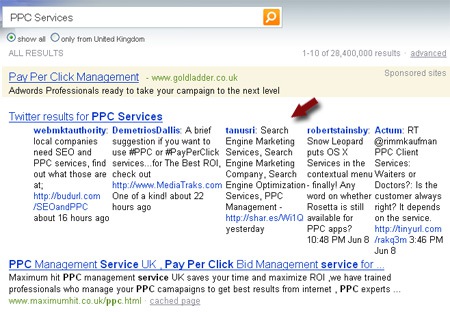
Bing + Twitter

This time I am following up with more cool Grease monkey scripts for early Bing adopters:

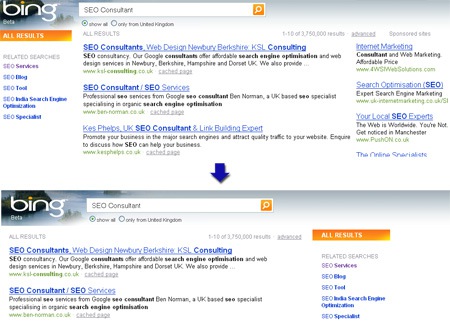
1. Bing Numbered Results: add numbers to Bing results:

Bing Numbered Results

2. Bing Cleaner: removes sponsored results and moves "Related Searches" to the right (for easier click-through):

Bing Cleaner

3. Google + Bing: adds Bing search results to Google:

Bing + Google

Source : Check out the SEO Tools guide at Search Engine Journal.


If you enjoyed this post, make sure you subscribe to my  RSS Feeds !!

If you enjoyed this post, make sure you subscribe to my E-NewsLetter !!

Posted By: KirubaKaran
Microsoft Certified Technology Specialist

Windows Mobile Technology - ROBIN

wm65_robin

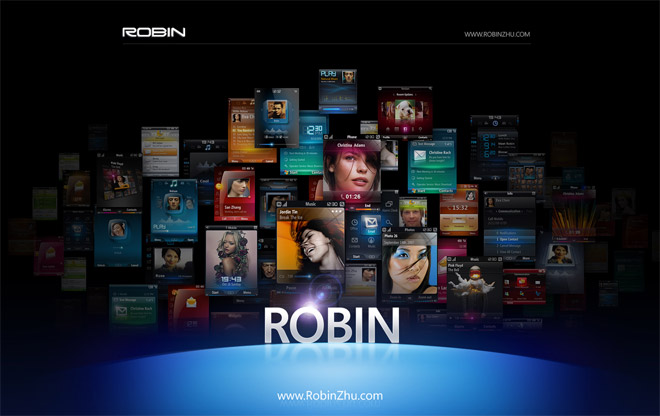
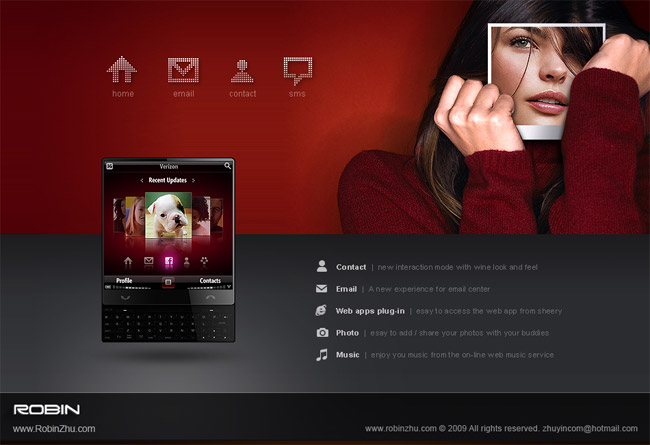
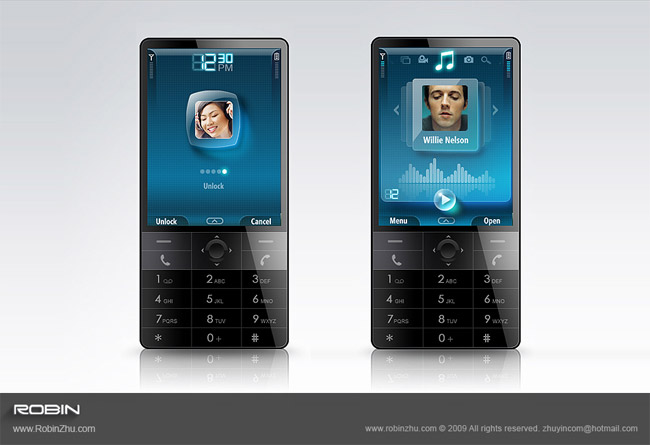
Chinese Microsoft enthusiast blog LiveSino.net today posted a bunch of links to some interesting portfolios by a handful of Chinese designers who works at the Microsoft Advanced Technology Center (ATC) Studios in Beijing. What many people don’t know is that the ATC has been largely responsible for the user experience design of Windows Mobile. This however is no longer the case as WM 6.5 was their last project, but up and until now, they’ve been busy conceptualizing the future of Windows Mobile. Most of those concepts have never surface in public before, until now.

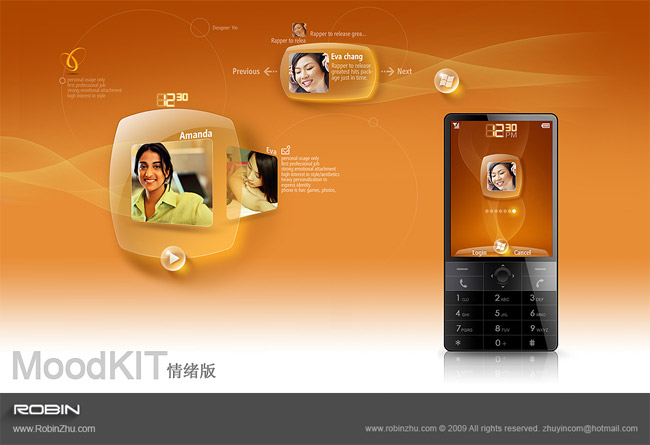
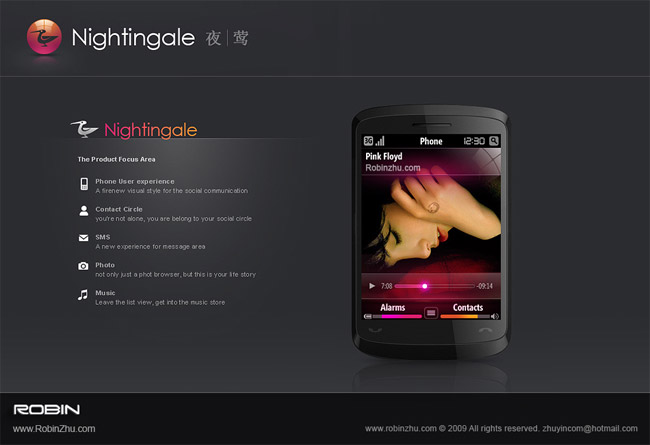
Out of all the portfolios linked, one stands out as the juiciest. Teng Lei, a user experience designer at the ATC recently blogged about a new portfolio by Robin Zhu (not yet launched) who appears to also work at the ATC. What appears to be a teaser quickly turns into an enormous gallery of high resolution clippings from Robin’s portfolio which showcases some extraordinary Windows Mobile concepts he’s designed over the years.

Here’s a select few I found the most interesting, but I would encourage everyone to visit the original blog post to see the whole range.

wm65_robin

wm65_robin

wm65_robin

wm65_robin

With these amazing UX concepts, one wonders, where did it all go wrong for Windows Mobile? [VIA]


If you enjoyed this post, make sure you subscribe to my  RSS Feeds !!

If you enjoyed this post, make sure you subscribe to my E-NewsLetter !!

Posted By: KirubaKaran
Microsoft Certified Technology Specialist
India Makes A Move In Developing Unique Identification System

Select Dot

Till date, we(Indians) have a very insufficient system of Unique identification system, we call them as PAN card (Permanent Account Number). This card as an Unique number that identify the respective person. In this millennium year is this system enough for us? So we made a move towards the Unique identification system that has barcode and many features.

We expect that these identification system will start its role from 2011 and one more hot news about this is, The complete project for developing this system was handed over the Indian Software Giant Infosys.

This will be a very massive project and could bring a great change in the Indian IT infrastructure. The Government is spending about Rs 150,000 crores for this project. The effectiveness and advantages of this system will depend fully on the provision and norms of the data to be stored in the card. This could include information like the locations the individual travels, immigration, hotels, shopping centres, railway stations, etc. If every citizen has to go through a security gate to enter the airport and he needs to swipe his card, his visit is noted and suppose he is not supposed to enter that particular location, the entry should be restricted. There could be alarms set to a particular card to trace a particular persons location. Even I would suggest to have the card with health records. For example if I go to a particular hospital, my treatment, diagnosis should be updated to my smart card. Next time I go to another city need a Doctor’s consultation, I don’t need to carry my previous health record, instead, the Doctor can get my health record from my smart card. In case of loss of my smart card, I should be able to get my new card proving my identity or some security questions, password to get a new card instantly.

Advantages of having a Smart Identification Card for every Indians

  • Every citizen of the country is accounted. All the information about that person can be saved in the smartcard and can be accessed and updated when needed.
  • If this smart card has more information like health record, travel details (Check at immigration, airports, hotels) this will be of great use.
  • This will really boost the IT infrastructure of the country, for instance every hotel or every shop should be connected to this system and records of every citizen should be updated. This can be very helpful in keeping a watch or tracking security issues.
  • Right now we have many identification system, like the Voters card, Passport, Driving license, but once this system is introduced, we should follow one and only Identification system and this should be the Unique Identification Smart Card. For every purpose the card should be access, checked and updated.
  • No need to carry health records if the card has a provision to store health records.
  • Every prime location should be identified (Like Airports, Railway stations, Hotels,  Universities) and the entry should be secured through these smart cards. Label-Collage
  • This project will really improve the IT infrastructure of India. Every key location will be secure through these cards which will be very useful to track the visitors, time of visit, etc.
  • Track ourselves – If we have provision to read our movements connecting the card to our home computer, we can know where we went on a particular day.
  • Updates from different departments – Suppose the IT department wants to update you about your returns, they can do it from their system and when you read you card, you get the updates
  • There will be lots of advantages using this smart card, but we need to wait and see the level of implementation, access level and security.

Already there are many developed countries has this system running, so we need to study those examples and create a smart card covering all the loopholes and problems to create a really SMART card. I am sure Mr Nilekani is the right man from India to head such a great project. Surely this will cause some barriers in the freedom of moment, but looking into recent security issues, we Indians should be ready to accept the conditions and hope for the best to our Country.


If you enjoyed this post, make sure you subscribe to my  RSS Feeds !!

If you enjoyed this post, make sure you subscribe to my E-NewsLetter !!

Posted By: KirubaKaran
Microsoft Certified Technology Specialist

MJ Died on 30th August 2007?

Everyone was shocked about the death of MJ that happened two days before, but the great web giant Google, datamine’s the MJ death as if the incident happened two years before..!!

Take a look at the snap shot:

MJ dead in 2007

According to Google, Michael Jackson did not pass away two days ago. Instead, the search engine is serving a customized result (powered by Wikipedia) stating that the King of Pop died on August 30th 2007 :

Such is the shameful problem of Google depending on “user generated content” from Wikipedia as a trusted resource, serving the obituary of an little known English writer named Michael Jackson during a time when the world is searching for information on the death of THE Michael Jackson. Google, you need to fix this immediately.

For more information Check out the SEO Tools guide at Search Engine Journal.

Michael Jackson Died in 2007 : According to Google & Wikipedia


If you enjoyed this post, make sure you subscribe to my  RSS Feeds !!

If you enjoyed this post, make sure you subscribe to my E-NewsLetter !!

Posted By: KirubaKaran
Microsoft Certified Technology Specialist
New Aero Features In Windows 7

If you are using the same windows theme, please ping me back.aerosnap1

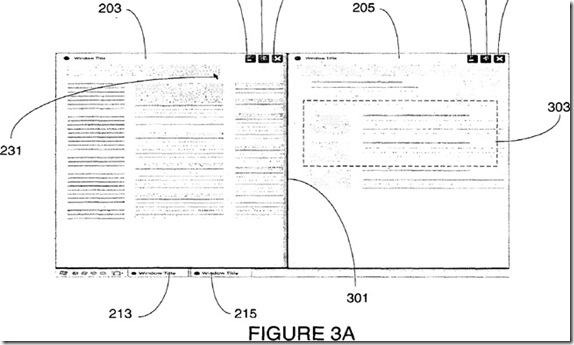
I always get a kick out of reading about Longhorn-era technology that never saw the light of day, only to be implemented years later. Days ago, a couple of then-Microsoft designers working on what was Windows Codename “Longhorn” at the time were granted a patent they filed all the way back in 2005. On closer inspection, their idea is reminiscent of the Aero Snap feature in Windows 7 today, but arguably more powerful.

If you’ve been living under Mount Rushmore for the last 6 months and haven’t yet tried or seen Windows 7, then Aero Snap is a windows management feature that allows you to use mouse gestures to manipulate the size of windows. Whilst maximizing a window was something that was already trivially easy to do, docking two windows side-by-side was not. With Aero Snap, you would simply drag one to the left, and another to the right. Voila.

The Longhorn designers too thought of this windows management problem and came up with a slightly different solution, which I’m going to nickname “Aero Link”.

aerosnap2

The first thing that’s different about “Aero Link” is the way it is triggered. Instead of dragging two arbitrary windows to the sides of the displays, it is suggested that one window be dragged to the titlebar of another, with a visual indicator indicating an action occurring. Alternatively it is also suggested that the same trigger can be performed in the taskbar dragging an application’s button onto another application’s button.

aerosnap3

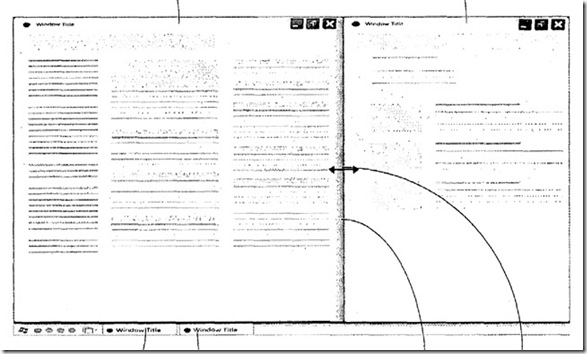
The end result of course is as one would expect, two windows side-by-side sharing the entire screen. It might not look any different, but this is where “Aero Link” starts to shine. Because the user has created a symbolic relationship between two windows, the windows would operate in synergy.

It is suggested for example, scrolling one document in the application on the left, would also scroll the document in the application on the right. Furthermore, an API would attempt to neutralize any differences between the applications such as font-size and font-family in a document application so the “child” application would match the “parent” application. Minimizing one application would also minimize the other

aerosnap4

Another cool aspect of this particular implementation is that by resizing one window, in reality it would be like shifting the balance between the two applications, thus easily controlling the split between the applications.

aerosnap5

Finally, it was even suggested to create a new windows paradigm to encapsulate the relationship between two application windows by a new parent container as suggested in the diagram on the left, or by removing one set of windows controls as indicated on the right[VIA]


If you enjoyed this post, make sure you subscribe to my  RSS Feeds !!

If you enjoyed this post, make sure you subscribe to my E-NewsLetter !!

Posted By: KirubaKaran
Microsoft Certified Technology Specialist
Updated Ping Server List

Are you using Windows Live Writer for blogging, Then use this ping servers list to notify the various Bots to crawl your website. Believe me this will bring much more traffic.

"...Here is a list of ping servers to cut and paste into the form located in Tools > Preferences > Ping Servers :"

For a nice list of ping servers,

http://blogsearch.google.com/ping/RPC2
http://1470.net/api/ping
http://api.feedster.com/ping
http://api.moreover.com/RPC2
http://api.moreover.com/ping
http://api.my.yahoo.com/RPC2
http://api.my.yahoo.com/rss/ping
http://bblog.com/ping.php
http://bitacoras.net/ping
http://blog.goo.ne.jp/XMLRPC
http://blogdb.jp/xmlrpc
http://blogmatcher.com/u.php
http://bulkfeeds.net/rpc
http://coreblog.org/ping/
http://mod-pubsub.org/kn_apps/blogchatt
http://www.lasermemory.com/lsrpc/
http://ping.amagle.com/
http://ping.bitacoras.com
http://ping.blo.gs/
http://ping.bloggers.jp/rpc/
http://ping.cocolog-nifty.com/xmlrpc
http://ping.blogmura.jp/rpc/
http://ping.exblog.jp/xmlrpc
http://ping.feedburner.com
http://ping.myblog.jp
http://ping.rootblog.com/rpc.php
http://ping.syndic8.com/xmlrpc.php
http://ping.weblogalot.com/rpc.php
http://ping.weblogs.se/
http://pingoat.com/goat/RPC2
http://rcs.datashed.net/RPC2/
http://rpc.blogbuzzmachine.com/RPC2
http://rpc.blogrolling.com/pinger/
http://rpc.icerocket.com:10080/
http://rpc.newsgator.com/
http://rpc.pingomatic.com
http://rpc.technorati.com/rpc/ping
http://rpc.weblogs.com/RPC2
http://topicexchange.com/RPC2
http://trackback.bakeinu.jp/bakeping.php
http://www.a2b.cc/setloc/bp.a2b
http://www.bitacoles.net/ping.php
http://www.blogdigger.com/RPC2
http://www.blogoole.com/ping/
http://www.blogoon.net/ping/
http://www.blogpeople.net/servlet/weblogUpdates
http://www.blogroots.com/tb_populi.blog?id=1
http://www.blogshares.com/rpc.php
http://www.blogsnow.com/ping
http://www.blogstreet.com/xrbin/xmlrpc.cgi
http://www.mod-pubsub.org/kn_apps/blogchatter/ping.php
http://www.newsisfree.com/RPCCloud
http://www.newsisfree.com/xmlrpctest.php
http://www.popdex.com/addsite.php
http://www.snipsnap.org/RPC2
http://www.weblogues.com/RPC/
http://xmlrpc.blogg.de

http://rpc.blogrolling.com/pinger/
http://rpc.technorati.com/rpc/ping
http://rpc.weblogs.com/RPC2
http://api.my.yahoo.com/RPC2
http://services.newsgator.com/ngws/xmlrpcping.aspx
http://api.moreover.com/RPC2
http://www.blogpeople.net/servlet/weblogUpdates
http://bblog.com/ping.php
http://ping.feedburner.com/
http://ping.syndic8.com/xmlrpc.php
http://blogsearch.google.com/ping/RPC2    
http://rpc.icerocket.com:10080/    
http://rpc.pingomatic.com/
http://blogsearch.google.com/ping/RPC2
http://xmlrpc.bloggernetz.de/RPC2
http://bblog.com/ping.php
http://blog.goo.ne.jp/XMLRPC
http://api.my.yahoo.co.jp/RPC2
http://xping.pubsub.com/ping/
http://rpc.reader.livedoor.com/ping
http://ping.wordblog.de/
http://api.moreover.com/RPC2
http://blogsearch.google.at/ping/RPC2
http://ping.weblogalot.com/rpc.php
http://ping.bloggers.jp/rpc/
http://blogsearch.google.de/ping/RPC2
http://ping.namaan.net/rpc
http://rpc.technorati.jp/rpc/ping
http://zhuaxia.com/rpc/server.php
http://www.bloglines.com/ping
http://rpc.bloggerei.de/ping/

http://1470.net/api/ping
http://api.feedster.com/ping
http://api.moreover.com/ping
http://api.moreover.com/RPC2
http://api.my.yahoo.com/RPC2
http://api.my.yahoo.com/rss/ping
http://bblog.com/ping.php
http://bitacoras.net/ping
http://blog.goo.ne.jp/XMLRPC
http://blogdb.jp/xmlrpc
http://blogmatcher.com/u.php
http://bulkfeeds.net/rpc
http://coreblog.org/ping
http://effbot.org/rpc/ping.cgi
http://mod-pubsub.org/kn_apps/blogchatt
http://ping.amagle.com
http://ping.bitacoras.com
http://ping.blo.gs
http://ping.bloggers.jp/rpc
http://ping.blogmura.jp/rpc
http://ping.cocolog-nifty.com/xmlrpc
http://ping.exblog.jp/xmlrpc
http://ping.feedburner.com
http://ping.myblog.jp
http://ping.rootblog.com/rpc.php
http://ping.syndic8.com/xmlrpc.php
http://ping.weblogalot.com/rpc.php
http://ping.weblogs.se
http://pingoat.com/goat/RPC2
http://rcs.datashed.net/RPC2
http://rpc.blogrolling.com/pinger
http://rpc.icerocket.com:10080
http://rpc.pingomatic.com
http://rpc.technorati.com/rpc/ping
http://rpc.weblogs.com/RPC2
http://thingamablog.sourceforge.net/ping.php
http://topicexchange.com/RPC2
http://trackback.bakeinu.jp/bakeping.php
http://www.a2b.cc/setloc/bp.a2b
http://www.bitacoles.net/ping.php
http://www.blogdigger.com/RPC2
http://www.blogoole.com/ping
http://www.blogoon.net/ping
http://www.blogpeople.net/servlet/weblogUpdates
http://www.blogroots.com/tb_populi.blog?id=1
http://www.blogshares.com/rpc.php
http://www.blogsnow.com/ping
http://www.blogstreet.com/xrbin/xmlrpc.cgi
http://www.catapings.com/ping.php
http://www.lasermemory.com/lsrpc
http://www.mod-pubsub.org/kn_apps/blogchatter/ping.php
http://www.newsisfree.com/xmlrpctest.php
http://www.popdex.com/addsite.php
http://www.snipsnap.org/RPC2
http://www.weblogues.com/RPC
http://xmlrpc.blogg.de
http://xping.pubsub.com/ping

http://rpc.technorati.com/rpc/ping
http://rpc.pingomatic.com/
http://api.feedster.com/ping
http://api.moreover.com/RPC2
http://api.my.yahoo.com/RPC2
http://xping.pubsub.com/ping/
http://ping.blo.gs/
http://ping.feedburner.com
http://ping.syndic8.com/xmlrpc.php
http://ping.weblogalot.com/rpc.php
http://rpc.blogrolling.com/pinger/
http://rpc.icerocket.com:10080/
http://rpc.newsgator.com/
http://rpc.weblogs.com/RPC2
http://topicexchange.com/RPC2
http://www.blogdigger.com/RPC2
http://www.blogstreet.com/xrbin/xmlrpc.cgi
http://www.newsisfree.com/RPCCloud
http://ping.weblogs.se/
http://blogmatcher.com/u.php
http://coreblog.org/ping/
http://www.blogpeople.net/servlet/weblogUpdates
http://bulkfeeds.net/rpc
http://trackback.bakeinu.jp/bakeping.php
http://ping.myblog.jp
http://ping.bitacoras.com
http://ping.bloggers.jp/rpc/
http://ping.blogmura.jp/rpc/
http://xmlrpc.blogg.de
http://1470.net/api/ping
http://bblog.com/ping.php
http://blog.goo.ne.jp/XMLRPC
http://api.feedster.com/ping.php
http://api.moreover.com/ping
http://api.my.yahoo.com/rss/ping
http://bitacoras.net/ping
http://blogdb.jp/xmlrpc
http://mod-pubsub.org/kn_apps/blogchatt
https://phobos.apple.com/WebObjects/MZFinance.woa/wa/pingPodcast
http://ping.amagle.com/
http://ping.cocolog-nifty.com/xmlrpc
http://pinger.blogflux.com/rpc/
http://ping.exblog.jp/xmlrpc
http://pingqueue.com/rpc/
http://ping.blogg.de/
http://ping.rootblog.com/rpc.php
http://rcs.datashed.net/RPC2/
http://rpc.blogbuzzmachine.com/RPC2
http://rpc.britblog.com/
http://rpc.tailrank.com/feedburner/RPC2
http://rpc.wpkeys.com/
http://services.newsgator.com/ngws/xmlrpcping.aspx
http://signup.alerts.msn.com/alerts-PREP/submitPingExtended.doz
http://www.a2b.cc/setloc/bp.a2b
http://www.bitacoles.net/ping.php
http://www.blogoole.com/ping/
http://www.blogoon.net/ping/
http://www.blogroots.com/tb_populi.blog?id=1
http://www.blogshares.com/rpc.php
http://www.blogsnow.com/ping
http://www.holycowdude.com/rpc/ping/
http://www.lasermemory.com/lsrpc/
http://www.imblogs.net/ping/
http://www.mod-pubsub.org/kn_apps/blogchatter/ping.php
http://www.newsisfree.com/xmlrpctest.php
http://www.popdex.com/addsite.php
http://www.snipsnap.org/RPC2
http://www.weblogues.com/RPC/
http://bulkfeeds.net
http://thingamablog.sourceforge.net/ping.php
http://pingoat.com/goat/RPC2
http://xmlrpc.blogg.de/
http://zing.zingfast.com
http://blogbot.dk/io/xml-rpc.php
http://www.catapings.com/ping.php
http://effbot.org/rpc/ping.cgi
http://rpc.wpkeys.com
http://rpc.britblog.com
http://ping.fakapster.com/rpc
http://pinger.blogflux.com/rpc
http://blogsearch.google.com/ping/RPC2
http://rpc.icerocket.com:10080
http://rpc.pingomatic.com
http://blogupdate.org/ping/
http://www.feedsky.com/api/RPC2
http://bitacoras.net/ping/
http://rcs.datashed.net/RPC2 euro.weblogs.com
http://www.bitacoles.net/notificacio.php
http://ping.blogoon.net/
http://www.weblogues.com/ping/
http://blo.gs/ping.php
http://www.weblogalot.com/Ping/
http://www.packetmonster.net/xmlrpc.php
http://blogsearch.google.com/ping
http://www.blogupdate.org/ping/
http://blogupdate.org/sverige/ping/
http://rcs.datashed.net/RPC2
http://ping.feeds.yahoo.com/RPC2/
http://www.syndic8.com/xmlrpc.php
http://pingoat.com/
http://www.mod-pubsub.org/ping.php
http://www.weblogues.com/RPC
http://rpc.odiogo.com/ping/
http://www.bloglines.com/ping/
http://api.feedset.com/ping
http://rpc.pingomatic.com/RPC2

http://xping.pubsub.com/ping/

Some are them are repeated..

I've updated my Windows Live Writer Ping Servers and it seems to handle them okay (well at least I didn't get any errors when pinging after my last post ..


If you enjoyed this post, make sure you subscribe to my  RSS Feeds !!

If you enjoyed this post, make sure you subscribe to my E-NewsLetter !!

Posted By: KirubaKaran
Microsoft Certified Technology Specialist
Convert Your Power point Slide Into A Video

Are you a frequent speaker at search conferences? Getting prepared for the search conference must take plenty of time and effort. Well, here is a great tip how you can drive another benefit from your conference presentation: turn your PowerPoint presentation into the video file, record your speech and here you go: you have some great video content to promote and generate additional leads!

Here is a quick guide on how you can convert your PowerPoint presentation into a video:

Use a screen recording application to record your slideshow as it plays on your screen:

ScreenToaster is a free web-based tool that captures the screen and creates a movie. It requires registration (with email confirmation) after which you will be able to start recording immediately:

  • Using the shortcut (Alt+S) you’ll be able to start and pause recording any time.
  • Upload the video directly to Youtube or download it to your computer.

It currently doesn’t allow to add audio (the feature is promised to be coming soon) but you can add subtitles though.

ScreenToaster

CamStudio (Windows only, use Copernicus for Mac) is a nice free desktop capture program that records all screen and audio activity and creates standard .avi files.

Use a specialized application converting any PPT into the video file

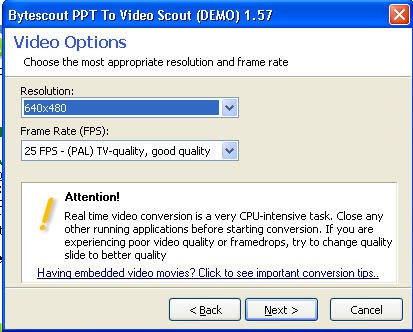
PPT To Video Scout 1.57 (cost: USD 58.85 with 30-day free trial available) is a very easy-to-use reliable desktop application that converts your PowerPoint file into the video and adds sound:

  • The utility converts PowerPoint presentations into AVI or MPEG video with sound;
  • Supported video formats: MPEG, AVI, DivX, xDIV, DVD, VideoCD
  • The program integrates itself into PowerPoint: you can use “Convert To AVI” command in File menu to launch conversion.

You can choose the capture format: normal (as viewed by F5 in PowerPoint), automatic slide show, manual mode (i.e. you click over the slides). You can also set the video quality and resolution:

PPT to Video Scout

After a very self-explanatory wizard you’ll be able to click over your PowerPoint slides while commenting on each of them; the utility will be capturing the screen while you are clicking and talking and turning into the video of the format you have set previously.

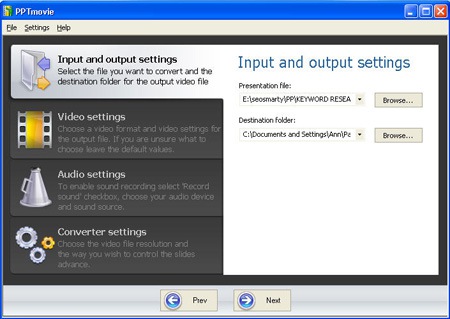
PPTmovie ($39.95 for personal edition with free trial available) is the cheapest yet very handy desktop application that not only can convert .ppt files to .avi, .mpeg, .mp4, .mov, .flv files but also add narrations or music background while converting:

  • Trial limitations: watermark (”to remove this message, buy PPTMovie”);
  • Requirements: MS Windows 2000/XP, MS PowerPoint installed, DirectX 9.0 or above.

PPTmovie

To record the music you just need to turn the favorite track on and PPTmovie will record it from your speakers without any noise while converting. Or you can record your comments to any slide you would like by using your microphone.[VIA]


If you enjoyed this post, make sure you subscribe to my  RSS Feeds !!

If you enjoyed this post, make sure you subscribe to my E-NewsLetter !!

Posted By: KirubaKaran
Microsoft Certified Technology Specialist
Now Get Windows 7 In Pen Drive

usb windows

Rumors arrive about the Microsoft releasing the windows Installation files in a pen drive keeping the Notebook users in mind.

I don’t know how far its true. But i read the same rumors info even in the top sites like CNN,Lifehacker and also few updates in Twitter.

Anyway take a look at the Thumb drive of Windows Installation files.

Image Credit via bfishadow


If you enjoyed this post, make sure you subscribe to my  RSS Feeds !!

If you enjoyed this post, make sure you subscribe to my E-NewsLetter !!

Posted By: KirubaKaran
Microsoft Certified Technology Specialist
Buy An Genuine Windows Online

Microsoft has already announced the release dates of their upcoming Windows 7 operating system as October 22 ,2009 . Windows 7 will be available in 6 editions named Windows 7 Starter, Home Basic, Home Premium, Professional, Ultimate, and Windows 7 Enterprise . Microsoft offers cheap upgrades for existing genuine Windows customers. All Windows Vista customers who are purchasing the OS from this June to December will have an option to upgrade their software to corresponding Windows 7 version for free . Meanwhile, many online shops started collecting orders for Windows 7 shipment. Interested customers can buy or pre-book genuine Windows 7 for approximately half the original price .

All genuine Windows 7 editions comes with downgrade option . That  is if you have Windows 7 Enterprise and you want to downgrade to Windows 7 Professional , it possible  select during installation .

Windows 7 edition downgrade option

Windows 7 installation requirements .

Official Windows 7  installation requirements as per Microsoft website are
1 GHz or faster 32-bit (x86) or 64-bit (x64) processor
1  GB RAM (32-bit) or 2 GB RAM (64-bit) . Additional 1GB needed for Windows XP mode
16 GB available hard disk space (32-bit) or 20 GB (64-bit)  . 15 GB extra for Windows Xp mode
DirectX 9 graphics device with WDDM 1.0 or higher driver .Those who are not sure about their PC hardware compatibility can use either Windows 7 upgrade advisor or benchmarking tools like Everest ultimate edition .

Windows 7 editions :

Windows 7 will have 6 editions as I said before ,but the notable ones are Windows 7 Home Premium ,Windows 7 Professional and Windows 7 Ultimate .
You can read the full comparison of features here .

Windows 7 pricing (As announced by Microsoft ) :

Windows 7 Home Premium (Upgrade): $119.99
Windows 7 Professional (Upgrade): $199.99
Windows 7 Ultimate (Upgrade): $219.99
Windows 7 Home Premium (Full): $199.99
Windows 7 Professional (Full): $299.99
  Windows 7 Ultimate (Full): $319.99

Buy or Pre-Order Windows 7 Genuine online :

Here is a list of online malls where you can pre-order or choose to upgrade current Windows versions to genuine Windows 7 . All offers will be processed and shipped from October 22 ,2009 .
Newegg.com :   Buy Windows 7 upgrade online .
Amazon.com     Buy Windows 7 upgrade online
Microsoft store :Buy Windows 7 professional online upgrade .
Currently these online stores offer Windows 7 professional upgrade for 99 USD and  Windows 7 Home premium upgrade for 49 USD . These offers are only valid from Friday June 26  2009  to July 11  .


If you enjoyed this post, make sure you subscribe to my  RSS Feeds !!

If you enjoyed this post, make sure you subscribe to my E-NewsLetter !!

Posted By: KirubaKaran
Microsoft Certified Technology Specialist

How To Get Feedback From Your Blog Visitors

This is a must read post for all bloggers.

Today, if you have visited my blog, you would have notified a new widget at the Top-Left Corner..!! Its an simple widget, but a most important widget that is required for all bloggers. I recommend this for all blogs and website. This widgets attracts your visitors to give a feedback about your blog. I realize that feedback are too valuable for all bloggers.This feedback widget is called as Kampyle.

The Snapshot of the above widget is as shown:

en-orange-corner-up-rightOk.. Now lets move on. The another feature of this widgets is it cost nothing. This provides you a powerful on-demand solution to collect, analyze and manage your website visitors' feedback.

Okay now let me tell you how does this widget work.

When a visitor comes to your site, the scripts run in background and when they stay in your website for more than 30 sec(You can increase or decrease the time when you create the widget), it creates a assumption that the user got well binded with your blog, now he/she can give some feedback about your blog.

The Feed Back Form appears like this

FeedBack

If the users are not interested, simply they can give no, This is so important because it should not irritate your visitor. If the visitor is willing to give you feed back the script takes you to the next steps.

The Kapyle widget is so easy to create and install and one of the most important feature of this widget is you can place this widgets in the four corners of your blog and also as a link to provide feed back.

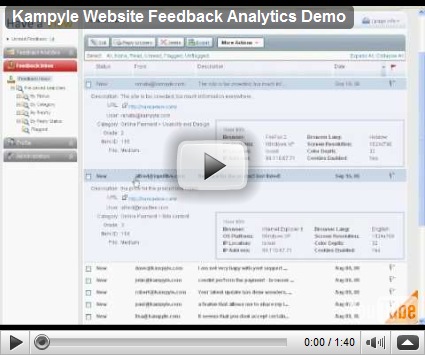
This widgets also provides you a Analytics: Check this video:

Don’t worry about SPAM feed back because when visitors give feed back, the kampyle uses the e-mail authentication for identifying the spam. So your get your valuable feedbacks for your blog.

Its worth to give a try.. !!

I request you to visit my blog and provide me feed back about my blog. Please provide me your valuable suggestions.


If you enjoyed this post, make sure you subscribe to my  RSS Feeds !!

If you enjoyed this post, make sure you subscribe to my E-NewsLetter !!

Posted By: KirubaKaran
Microsoft Certified Technology Specialist

Windows 7 Price List

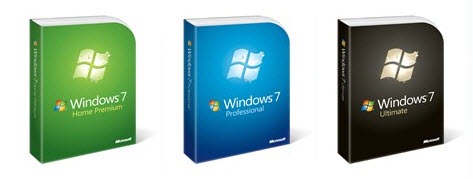
Few days back, Microsoft revealed the official packaging of upcoming Windows 7. Now, it’s time for Windows 7 pricing and upgrade option program.

windows 7 official pack covers

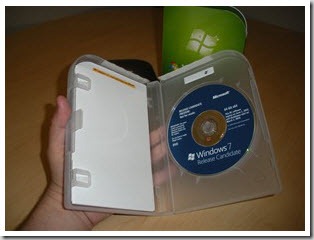
inside look

Windows 7 will be available in 14 languages on October 22nd. The Windows 7 Upgrade Option Program will be available until January 31st, 2010 – and is global!

Pricing and upgrading options for Windows 7

The estimated retail prices for upgrade packaged retail product of Windows 7 in the U.S. are:

  • Windows 7 Home Premium (Upgrade): $119.99
  • Windows 7 Professional (Upgrade): $199.99
  • Windows 7 Ultimate (Upgrade): $219.99

And the estimated retail prices for full packaged retail product of Windows 7 in the U.S. are:

  • Windows 7 Home Premium (Full): $199.99
  • Windows 7 Professional (Full): $299.99
  • Windows 7 Ultimate (Full): $319.99

You can also pre-order Windows 7 @ 50% price starting tomorrow, if you’re from U.S., Canada and Japan. Customers in the UK, France and Germany, can pre-order their copy of Windows 7 starting July 15th. This special offer is time limited and vary per country.

In the US, it means you can pre-order Windows 7 Home Premium for USD $49.99 or Windows 7 Professional for USD $99.99.

Check the full details @ Windows Team blog


If you enjoyed this post, make sure you subscribe to my  RSS Feeds !!

If you enjoyed this post, make sure you subscribe to my E-NewsLetter !!

Posted By: KirubaKaran
Microsoft Certified Technology Specialist

Get The Status of Any Web Page Last Updated

Many times we come across websites or blogs where the dates of the posts are not displayed or made hidden so that a person doesn't come to know when that page was last updated.

With this simple trick you can come to know when a specific Web page was last updated.

This trick is proven to work for every web page and has been personally tested by me on Internet Explorer, Firefox, Safari, Google Chrome, and Opera.

To determine when a page was last updated, follow these simple steps:

01. Open the page for which you want to get the information. Like for me its I333
i333 homepage
02. Clear the address bar [where you type the address of the sites]:
clear address bar
and type or copy/paste from below:

javascript:alert(document.lastModified)

paste javascipt
03. Press Enter or Go button:
press enter or ok
and Voila! a message box will come up displaying the date and time of the last update of that particular page:
message box
Press the OK button to remove the notification and continue browsing.
press ok button
This way you can know When Was A Web Page Last Updated.’ Hope you enjoyed it!


If you enjoyed this post, make sure you subscribe to my  RSS Feeds !!

If you enjoyed this post, make sure you subscribe to my E-NewsLetter !!

Posted By: KirubaKaran
Microsoft Certified Technology Specialist

Get Paid For Giving Idea For A Domain Name

interlink_domain A Japanese company called Interlink [JP] is organizing a contest to find potentially lucrative future gTLDs (generic top-level domains). And the best thing is that the “World Domain Cup” is open to everyone with the contest’s dedicated web page being available in English, Japanese and Chinese. Controlled (and restricted) by the ICANN, gTLDs currently in use are domains such as .com, .biz, .aero, .info etc. What Interlink is now looking for is a killer idea for a new gTLD, as the ICANN plans to give the green light for a broader range of these domains in the near future. If you submit your idea to Interlink and if the TLD really gets accepted by the ICANN later, Interlink will give you $10,000 in cash, followed by $1 for each domain registration for the next 10 years. Not bad at all. Virtually everybody can apply here (you have time till the end of September). It should just take a minute to fill out the form once you have an idea for a cool domain name. Interlink says the lucky winner (whose name will be announced November 30) can make $80 million if the new TLD is as popular as .com, but come on, that will not happen. Via Asiajin


If you enjoyed this post, make sure you subscribe to my  RSS Feeds !!

If you enjoyed this post, make sure you subscribe to my E-NewsLetter !!

Posted By: KirubaKaran
Microsoft Certified Technology Specialist

How To Recover Data From A Scratched Disk

We usually encounter situations when CD and DVD media get scratched due to misuse and rough usage . But its will become necessary to recover files from these scratched CDs or DVDs in needy situations . Here we have collected few Windows software's that can recover music ,programs and documents from scratched CD and DVD media . Most of them are sharewares ,but they have freeware versions too .Recovering files from scratched CDs and DVDs requires lot of time and efforts . So make sure that you have enough RAM (at least 1GB ) to speed up the entire process .

Usual CD or DVD software ignores the bad sectors and produce errors while copying files from them . Also they stop copying if they encounter any errors in between . So we might loose data from entire disk due to scratches in one or two portions .  These scratch recovery software's reads all possible sectors from magnetic media of CD/DVD or USB disks  and arranges them together to recover files from scratched areas . Clean target CD/DVD file with spirit or any other safe solution and dry thoroughly before applying the recovery process .

CDcheck

CDheck utility can recover music ,video ,documents ,programs and other media from CD and DVD . CDheck application is free for home use . And for business users there is a small charge associated .

CDcheck CD DVD recover software

Insert the target CD/DVD/USB disk > click on recover and select the target location . All recovered files will be moved to the target folder after completion of operation .
Download CDcheck .

CD Recovery Toolbox

  CD Recovery Toolbox is an excellent tools to recover files from scratched CD ,DVD ,HD DVD  and Blue-Ray disks . Its a completely free software with excellent user interface and a wizard driven operation . we can exactly target the required file from options and easily recover them to a suitable location .

CD Recovery Toolbox

Download CD Recovery Toolbox .

Bad Copy Pro

Bad Copy Pro is one best software tool to copy inaccessible files from non responding  CD and DVD disks . It can sometime be used to copy files from protected media disks too . Unfortunately its a shareware software ,but available as a limited trial version .  This 800 KB application is one of the most trusted application in CD- DVD file recovery .

BadCopy Pro

First select the source > select the files to be recovered and the mode of recovery . Max speed option can be selected for disk with less errors .
Download Bad Copy Pro and recover files from scratched CD ,DVD ,USB and Floppy disks .


If you enjoyed this post, make sure you subscribe to my  RSS Feeds !!

If you enjoyed this post, make sure you subscribe to my E-NewsLetter !!

Posted By: KirubaKaran
Microsoft Certified Technology Specialist
Get Your Google Search Results as a Excel File

Saving Google results as an Excel file may open up plenty of possibilities for advanced analysis you would never think of before.

SEOquake is a FireFox addon that has plenty of options - and one of them is the ability to export Google search results in a CSV file which you can open with Excel.

The export file contains:

  • Each listing URL;
  • Any additional data you set SEOquake to retrieve (e.g. Google PageRank; Google cache date, Yahoo links, etc).

seo quake

This handy little feature allows for a wealth of possibilities. Do you want to know how many people saved each page of your site to Delicious and how many backlinks each one has? No problem!

  • Configure SEOquake to only show you Yahoo backlinks to a page and Delicious index,
  • Set Google to show you 100 results per page;
  • Run {site:yoursite.com}search in Google;
  • Export results to csv;
  • Play with all those sorting and filtering options Excel has to offer.

This will give you an idea of how many backlinks versus Delicious bookmarks (considering both can be the metrics of the resource usefulness) the site has:

seoquake-excel

Source : How to Export Google Search Results to Excel


If you enjoyed this post, make sure you subscribe to my  RSS Feeds !!

If you enjoyed this post, make sure you subscribe to my E-NewsLetter !!

Posted By: KirubaKaran
Microsoft Certified Technology Specialist
Upgrade To Kaspersky Anti Virus 2010

Just got updated to the latest version of the Kaspersky anti virus.Kaspersky has released the final version of Kaspersky internet security 20Download Kaspersky internet security  antivirus 2010 final 10 and Kaspersky antivirus 2010 .All Kaspersky 2009 users can upgrade their versions to the latest solution for free . We have already reviewed the new features of Kaspersky internet security 2010 and Kaspersky Antivirus 2010 . Both of them are built with existing Kaspersky security technologies with enhanced new user interface that is operable by first time users . Kaspersky internet security 2010 ,for the first time includes a web link checker addon for Firefox 3.5 . Kaspersky internet security 2010 and antivirus 2010 is a must have update for all users . Download it now .

Kaspersky internet security 2010 final

Kaspersky internet security 2010 final

Kaspersky provides a 30 day trial activation key for Kaspersky internet security 2010 and Kaspersky antivirus 2010 . You can avail this during the installation process  .

Download Kaspersky internet security 2010 final  .
Download Kaspersky Antivirus 2010 final .


If you enjoyed this post, make sure you subscribe to my  RSS Feeds !!

If you enjoyed this post, make sure you subscribe to my E-NewsLetter !!

Posted By: KirubaKaran
Microsoft Certified Technology Specialist

Now Computer Finds Your Gender (M/F)

Technology is getting more and more sophisticated by the day. A couple of weeks back I had written a post on how a software could change your gender on the computer instantly. Today, the post talks about a newly developed “Gender Recognition System” that could change the way advertising will work for you in the future.I am not going to explain its algorithm and all. Just what it can do..?

Computer Gender

What does Gender Recognition System do?

A*Star (Singapore’s Agency for Science, Technology and Research) has developed a smart image recognition software that has the ability to detect frontal human faces on digital video stream quickly and reliably. This technology was displayed at Communic Asia 2009, held at the Singapore Expo.

  • Based on the extracted face images, the engine is able to simultaneously detect the genders of multiple persons. It recognizes someone as either a guy or a girl when an image of a person is captured with a regular webcam.
  • In addition to that, it can return the statistic of the viewers such as the number of person looking at the screen.

For example:

It can be set up to deploy targeted advertisements - a beer ad for a guy walking past and a shoes ad for a girl strolling across.

Targeted Advertising?

Advertisers across the globe are now looking for marketing vehicles that have better customer receptivity. With the growing consumer demand and their reduced attention span, the effectiveness of traditional mass media has tremendously gone down.

The Internet has attracted billions of advertising dollars. Gender Recognition System can help in more effective displaying of information, branding and offering an enhanced customer experience. In summary, this technology cold provide the means to measure audience demographics which could be helpful for the advertising industry.

Benefits

  • Efficient retrieval of statistics that includes
  • Gender detection
  • Attention span
  • Audience count
  • Non-intrusive detection
  • Support low-cost camera
  • SDK for integrating engine into the hosting application

Features

  • Recognize the gender of the user with low cost camera
  • Real time detection (6 frames / second)
  • Support simultaneous multiple objects detection
  • Support object counting
  • SDK available

Technology

  • Development is done on Windows Platform

Currently, the gender-recognition system is in its beta and hopes to come up with the next version by the year-end.

Link: exploit-tech

(Source: exploit-tech | Gender Recognition System)


If you enjoyed this post, make sure you subscribe to my  RSS Feeds !!

If you enjoyed this post, make sure you subscribe to my E-NewsLetter !!

Posted By: KirubaKaran
Microsoft Certified Technology Specialist

How To Show Ads In Between The Blog Post To Earn More From Adsense

Just now learnt how to insert Google ads in between the blog post from the the devils workshop blog, Yes, showing Adsense Ads after each blog post was never simple like this! As this is one of the most awaited feature which Google integrated into Blogger! Also this means blogger won’t be needing our one of the most famous hack to Show ads after each post to earn more from your blogger beta blog!

Here is 3-step Guide to do it for your blogger blog…

  1. Log into your Blogger account at http://www.blogger.com .
  2. Visit your blog’s Template tab and click on the Page Elements link.

blog template

  • Click Edit in the Blog Posts section.
  • Check the box next to Show Ads Between Posts. You can then select how often you’d like your ads to appear, such as once after every post or once after every other post.
  • blog inline adsense

    1. Customize the ads and click on Save Changes when you’re done.

    Can it be made further simple??

    One thing I feel Google should provide is ability to choose where to insert ads! I mean before posts, after posts or after few lines/paragraphs!

    Ever more fine grain control can be given to blogger by giving ability to insert adsense codes any where between the posts! Say integrating some widget in post editor!


    If you enjoyed this post, make sure you subscribe to my  RSS Feeds !!

    If you enjoyed this post, make sure you subscribe to my E-NewsLetter !!

    Posted By: KirubaKaran
    Microsoft Certified Technology Specialist
    How To Save BING Background Image?

    Bing, as we know, is slowly increasing their user base. Whether the reason is its novelty or usefulness is a different debate altogether. But one of the interesting features in Bing is the background image that appears on the main page. It gets changed daily, and contains information about the place in the image too.  But there isn’t any way to download the image to our computer directly.

    We cannot save the image by using right click -> Save Image As. So here’s the trick.

    First of all we’ll need Firefox. Now open Bing in it and follow the steps:

    • Go to Tools

    media tools

  • Now click on Page Info
  • In the new pop-up that opened, click on the Media tab.
  • firefox tools.jpg

  • Now search for the image. Just click on any link, and you will get the preview of it at the bottom. [Hint: The link to the background image will mostly be the longest one.]
  • Now just select the Save As.. button at the bottom right corner of the window. Your Done!
  • Source : www.devilsworkshop.org


    If you enjoyed this post, make sure you subscribe to my  RSS Feeds !!

    If you enjoyed this post, make sure you subscribe to my E-NewsLetter !!

    Posted By: KirubaKaran
    Microsoft Certified Technology Specialist
    Ebay Too Dangerous For Adsense Accounts

    ebay adsense"AdSense - the hottest way to earn money on internet at the moment" - says one auction. Ebay is flooded with such auctions of Adsense eBooks and Videos, Adsense Ready Websites and Templates that promise you Instant Adsense Cash without any efforts or sometimes even without a website.

    I won't comment if any of the Adsense books or videos would help in improving Adsense earning, but there are some more risky Adsense related goods on ebay that may actually get you banned from the Google Adsense program.

    Here are some Adsense auctions on eBay that may not be safe:

    Google AdSense Toolbar 1.0 : Get 1000'S of Legal Clicks Daily to your Adsense Ads! The Adsense Toolbar is the best solution to make a large amount of money from Adsense for Search without paying expensive advertisement or traffic costs. [$25]

    Adsense Web site which makes me $40,000 Per Month : Own a copy of my website which earns me over $40,000 per month. [$127]

    Guaranteed Unlimited Legal Adsense/PPC Clicks : This is a very simple system, even a child can do it. I will setup your system for you and just tell what to do. This sytem applies to all web-sites having PPC contextual advertisements even from Yahoo, VMP, Clicksor, BidVertiser, Adbrite, BannerBoxes.

    $ Traffic & Banner Clicktool Adsense Advertising Cash $ : This tool uses proxy servers to click Adsense ads or other affiliate banner ads for you. According to description, you simply can enter an Internet address into the corresponding text field, you enter the number of the desired Clicks and Timeinterval between the clicks. After the start the clickMaster1.1 takes care of the clicks for you. [$1.25]

    Blog & Ping Automator, Make Huge Adsense Profits! - This software goes out and gets the very best content—either from the internet or from your site—and posts the first portion of each article into a blog entry. Visitors come, they click on the ads, Google AdSense sends you huge checks.

    Adsense Toolbar the Original - The Adsense Toolbar does emergency only increase your surf comfort into the Internet through selected ADDS Ons, but it offers tons you additionally leases three outstanding features in itself, which are unique for today's Toolbars, worldwide.

    Apply your brains and stay clear of such products which promise to make you a Adsense millionaire overnight.

    The only thing that works is Original Content and good relationships with fellow bloggers and readers - rest all will follow automatically.

    Source : www.labnol.org


    If you enjoyed this post, make sure you subscribe to my  RSS Feeds !!

    If you enjoyed this post, make sure you subscribe to my E-NewsLetter !!

    Posted By: KirubaKaran
    Microsoft Certified Technology Specialist

    Wikipedia Book


    I can’t even imagine of turning Wikipedia into a Book..!! have you ever dreamt?

    I didn’t believe this either, till i see this picture.

    The English edition of Wikipedia Encyclopedia contains around 3 million articles as of now and if someone were to print the entire Wikipedia encyclopedia into a book, the size of that book would roughly be equivalent to 952 volumes of the Encyclopedia Britannica.

    Not sure if anyone is willing to go that far but a student in UK has actually converted 0.01% of the Wikipedia encyclopedia into a printed book. See some pictures below:

    wikipedia book

    This Wikipedia book has some 5,000 pages and it’s a compilation of 400+ featured articles all picked from Wikipedia. And, as you can easily make out from the photographs, the book is huge - it’s about 1ft 7in. high which is like placing 4 iPod Touch devices on top of each other.

    wikipedia print

    I have only one question.. Who is going to read the book..??

    Source : www.labnol.org


    If you enjoyed this post, make sure you subscribe to my  RSS Feeds !!

    If you enjoyed this post, make sure you subscribe to my E-NewsLetter !!

    Posted By: KirubaKaran
    Microsoft Certified Technology Specialist

    Recent Posts