Showing posts with label Miscellanous. Show all posts

What Is PetaByte?

Mozy has put together a series of stats which can help you understand as how much data size a Petabyte contains. This image stat below is really amazing!

Whats a Petabyte

[via] Mozy – How Much Is A Petabyte?

Google Adsense Account Banned? See here for how to get a Google Approved Adsense account with your name and address.. See this website for more details. http://googleadsenseaccount.wordpress.com/


If you enjoyed this post, make sure you subscribe to my  RSS Feeds !!

If you enjoyed this post, make sure you subscribe to my E-NewsLetter !!

Also follow me at twitter to know what I am doing.

Posted By: KirubaKaran

Microsoft Certified Technology Specialist

BING Gets More Attraction

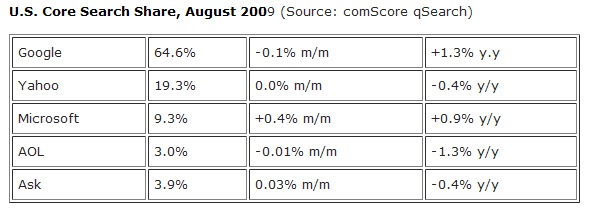
Opsie! Don’t look now but it seems that Microsoft’s $100 million marketing investment coupled with the slew of enhancements and usability features that it is introducing the past couple of months is finally reaping them rewards. And the reward comes by way of an increase of  0.4%  in their U.S. search market share for August.

uscoresearch

That figure may look small in numbers but what makes this sweet for Bing is the fact that it is the only search engine that grew in market share for August, data from comScore revealed (as reported by TechCrunch).

Google’s search query volume in the U.S. decreased by 0.1%, Yahoo’s share did not change .

If we are to add up all the increases in Bing’s search market share since its launch in May, we now have a total of 1.3%. Again it may not be that much but the important thing to note is that it is steadily gaining since then. A  few days ago, Nielsen declared Bing as the fastest growing search engine.

Should Google start worrying about this now?

Google Adsense Account Banned? See here for how to get a Google Approved Adsense account with your name and address.. See this website for more details. http://googleadsenseaccount.wordpress.com/


If you enjoyed this post, make sure you subscribe to my  RSS Feeds !!

If you enjoyed this post, make sure you subscribe to my E-NewsLetter !!

Also follow me at twitter to know what I am doing.

Posted By: KirubaKaran

Microsoft Certified Technology Specialist

Find Invisible Friends In YAHOO..!!

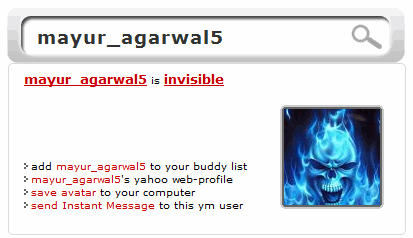
Yahoo messenger is a popular chat client used by most people. I’m listing out 3 free services which can tell you the real status of your friends on yahoo.

Find invisible friends on Yahoo messenger

These services tell whether a user is online, offline or invisible. Just enter the yahoo email id of your friend and easily know his availability status.

It is a smart way to catch users who become invisible and don’t want to chat :D

Google Adsense Account Banned? See here for how to get a Google Approved Adsense account with your name and address.. See this website for more details. http://googleadsenseaccount.wordpress.com/


If you enjoyed this post, make sure you subscribe to my  RSS Feeds !!

If you enjoyed this post, make sure you subscribe to my E-NewsLetter !!

Also follow me at twitter to know what I am doing.

Posted By: KirubaKaran

Microsoft Certified Technology Specialist

Tweet Deck Updates with Better Facebook

Windows/Mac/Linux (Adobe Air): Social media organizer TweetDeck pares down configuration buttons, adds full Facebook feeds and new MySpace support, and integrates more tightly with link shortening service Bitly in a new version. In other words, it's worth the update.

TweetDeck is mainly a Twitter client, but it's been making inroads into helping you organize, search, and compress your other social networks in later versions. Adding columns is now a bit more intuitive and specific, as TweetDeck asks you which account the column should come from, and which aspects of a feed should be shown. Along with the aforementioned status-checking features, there's now drag-and-drop photo uploading for Facebook posting, and new lists of recommended Twitter accounts to follow for different types, like "Journalists."

TweetDeck is a free download, works anywhere the Adobe AIR platform does.

TweetDeck [via CNET]

Google Adsense Account Banned? See here for how to get a Google Approved Adsense account with your name and address.. See this website for more details. http://googleadsenseaccount.wordpress.com/


If you enjoyed this post, make sure you subscribe to my  RSS Feeds !!

If you enjoyed this post, make sure you subscribe to my E-NewsLetter !!

Also follow me at twitter to know what I am doing.

Posted By: KirubaKaran

Microsoft Certified Technology Specialist

Create POLL’s In FaceBook

For me, Facebook is just like an apple iphone. Facebook hasn’t provided you with all the features by default but you can use as many applications as you require making it more user friendly. Just for example, I am going to explain here is a feature, which can be used to make polls on your Facebook profile that can be answered by anybody on Facebook.

You can use the application “Living Social” for this, which is simple and easy to use. Use this link to go to the application page.

Creating a Poll:

Step 1: Go to the application (click here) and choose a category. Use general if it’s not mentioned on the list. Click next to make possible answers for your question.

Step 2: Enter your question and select next.

Step 3: Now search for your answers and use them as options for your question. If not mentioned on the list by default then use “Don’t see what you want? Add your own!” Check out the screen shot below.

facebook-logo - Copy

Step 4: Type your answer and select an image from your computer. Image for each option is compulsory. Use at least two options to complete your poll.

Step 5: Publish your question. Publishing your question will make the poll visible to all your friends. You may also invite some friends to take the quiz.

That’s it; now your question will be on your friend’s homepage.

LINK: Living Social

Google Adsense Account Banned? See here for how to get a Google Approved Adsense account with your name and address.. See this website for more details. http://googleadsenseaccount.wordpress.com/


If you enjoyed this post, make sure you subscribe to my  RSS Feeds !!

If you enjoyed this post, make sure you subscribe to my E-NewsLetter !!

Also follow me at twitter to know what I am doing.

Posted By: KirubaKaran

Microsoft Certified Technology Specialist

ISRO Bhuvan Snaps

Comparing ISRO’s Bhuvan and Google Earth is that its like comparing a child with a full grown person. Google Earth has been at doing this for a long time so obviously ISRO Bhuvan cannot really reach that level as yet. Ofocurse being an Indian there is that sense of pride one can associate with Bhuvan :-)

Screenshot of ISRO’s Bhuvan:

ISRO Bhuvan

Screenshot of Google Earth:

Google Earth

Some differences between the two:

  • ‘Bhuvan’ is supposed to work with Internet Explorer 6.0  upwards and also recently with Firefox but I could not load it on Firefox. It worked fine with Internet Explorer 6. It still cannot be used with Chrome. Unlike Google Earth I had to register at the site before I could use Bhuvan.
  • ISRO’s Bhuvan is supposed to have resolution upto 10 mts but when I checked it first-hand I saw its resolution was not even upto the mark compared to Google Earth which is supposed to be about 200 mts. See both screen-shots from my computer which was overhead shot of our office building.
  • The ISRO site claims I could book-mark places with ‘Bhuvan’ in a map but finding a place on the map is quite a tedious task. The search option is good for looking up a city but not really helpful if you want to find a particular address or even a locality. ‘Bhuvan’ had no easy option for me to bookmark our rtBlogs office. With Google Earth usually most landmarks and roads are covered.
  • Google Earth is after all an application made by a private company for comercial purposes and hence it is quite open to listing tourist landmarks,  cafes, restaurants and hotels. ISRO Bhuvan is a application made by the Goverment of India and hence it obviously has its main focus on not strictly commercial aspect but more on geological factors like water tables and soil elevation.
  • ISRO Bhuwan has tried to emulate Google Earth and thats not a secret. The design struture the layout has tried to stay close to Google Earth and thats not really a bad thing for first time users but novelty would have been to do something different.
  • Finally Google Earth has evolved from a company since 2001 and Bhuvan’s prototype beta version was out on 12th August2009 and even ISRO admits it has bugs and they will be fixed over time. The challenges for ISRO will be mainly its ability to handle traffic which is often a goverment owned website’s  ’Achilles heel’.

I dont really think the two softwares will compete with each other in the recent future. Google Earth is far too well entrenched and ISRO Bhuvan has its sights on different functionalities compared to Google Earth. Also ‘Bhuvan’ covers India sepcifically and hence if they really do end up becoming competition to Google it might be only in India. I think that after the initial buzz dies down a bit ISRO’s Bhuvan will target a niche clientele which will include town and city planners along with road and railway developers.

Why dont you check out Bhuvan’s website for registration and leave your comments about the post for a lively discussion? ;-)

Links: Google Earth | ISRO’s Bhuvan

Source : www.devilsworkshop.com

Google Adsense Account Banned? See here for how to get a Google Approved Adsense account with your name and address.. See this website for more details. http://googleadsenseaccount.wordpress.com/


If you enjoyed this post, make sure you subscribe to my  RSS Feeds !!

If you enjoyed this post, make sure you subscribe to my E-NewsLetter !!

Also follow me at twitter to know what I am doing.

Posted By: KirubaKaran

Microsoft Certified Technology Specialist

Google Docs Can Covert Your Documents In 42 Languages

While most of us don't frequently find ourselves needing to translate our documents to various languages on-the-fly, Google Docs just announced a new feature that'll be great for those who do: The service now automatically translates docs in 42 different languages with a few mouse clicks.

Translating docs is a breeze: Just hit up the Tools menu, select Translate document, then choose the language you want to translate to. Docs will open the translated document in a new window, then offer to replace the original document with the translation or copy the translation to a new document. It's probably not for everyone, but it's a nice feature, nonetheless, and yet another example of Google's continued march toward integrating their various services.

Translate documents: sharing across languages and generations [Official Google Blog]

Google Adsense Account Banned? See here for how to get a Google Approved Adsense account with your name and address.. See this website for more details. http://googleadsenseaccount.wordpress.com/


If you enjoyed this post, make sure you subscribe to my  RSS Feeds !!

If you enjoyed this post, make sure you subscribe to my E-NewsLetter !!

Also follow me at twitter to know what I am doing.

Posted By: KirubaKaran

Microsoft Certified Technology Specialist

Search Engines Are Updated After BING’s Release

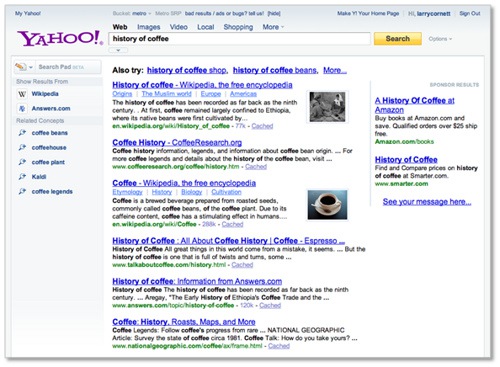
Interestingly, just when the Yahoo-Microsoft deal is a few months from materializing, here comes Yahoo telling us all what the Yahoo search engineers have been doing to give us a better Yahoo seach experience. First of  these enhancements is the new Yahoo search page design which according to a post on the Yahoo Search Blog “will make search more personally relevant and helps people explore things that matter most to them.” I have no idea what took Yahoo this long to make this enhancements and why it is doing all of these only now. Probably to tell us that with or without the Microsoft search deal, Yahoo is still a separate web entity.

newyahoosearch

So here are the new things that have been rolled out/will be rolled out on Yahoo Search:

  • A more unified search page design that realigns with the new Yahoo Home Page rolled out recently.
  • Easier access to various Yahoo search features including Search Pad, Search Scan and Safe Search
  • Addition of  ”Related Concepts” or what we usually refer to as “Related searches” in the search assist layer
  • Richer search results from more sites such as Wikipedia

These enhancements are being tested out to selected percentage of U.S. users.  It might take some more time before you can see it live.

Google Adsense Account Banned? See here for how to get a Google Approved Adsense account with your name and address.. See this website for more details. http://googleadsenseaccount.wordpress.com/


If you enjoyed this post, make sure you subscribe to my  RSS Feeds !!

If you enjoyed this post, make sure you subscribe to my E-NewsLetter !!

Also follow me at twitter to know what I am doing.

Posted By: KirubaKaran

Microsoft Certified Technology Specialist

Yahoo Recommends IE8

Not sure when this started occurring exactly, but Yahoo is apparently now letting Firefox users know that they’d be better off switching to the “new, safer Internet Explorer 8″. Apart from this tweet sent out yesterday, we haven’t noticed anyone noticing, so we suspect it’s fresh and a direct result of the recent Yahoo and Microsoft love-fest.

How ironic. About a year ago, following a failed acquisition attempt by Microsoft, Yahoo ran a very different recommendation from their front page, advising Internet Explorer users to switch to the “NEW safer, faster Firefox 3″ instead.

Apparently, Yahoo recommends browsers based on what their latest business alliances are.

Maybe they should just develop and market their own browser and rid the confusion?

More screenshots:


(Hat tip to @jacook11)


If you enjoyed this post, make sure you subscribe to my  RSS Feeds !!

If you enjoyed this post, make sure you subscribe to my E-NewsLetter !!

Also follow me at twitter to know what I am doing.

Posted By: KirubaKaran

Microsoft Certified Technology Specialist

Windows Live Movie Maker Rocks..!

Microsoft has taken the wraps of Windows Live Movie Maker, “the the one-minute way to turn photos and videos into great-looking movies that are easy to share — for free”.  You can download Windows Live Essentials now and get the new Movie Maker (and what appears to be some bug fixes for the other WL applications, no real signs of Wave 4 yet).

moviemakerpreview

(updated to include moviemaker preview link ):

We’ll get to the program and the new features in a minute, but along with the “unveiling” comes a new site extolling the virtues of Movie Maker: http://moviemakerpreview.com/  - lots of info there including a number of how-to videos and some sample content to play around with.   http://windowslive.com/desktop/moviemaker also has links to the download.  Always best to get it direct from Microsoft ;)

Note: Not sure if the new bits will be live all over the place all at once - you can download and save the installer, right click, select Properties, and check the Details for build number 14.0.8089.0726, just to make sure you're getting the new stuff).

Easy Easy Easy

We had a chance to try out Movie Maker in advance, but didn’t need much lead time to create a quick video out of pictures and video (the subject: puppies, of course!).  We found it easy to create and manipulate the video, with a few surprises (not being able to use files from a network location, for example).  Actually if anything it was TOO easy to manipulate – we tried to figure out how to change transitions for a few minutes before realizing it had already changed.  Here’s the video we created, not quite in less than a minute, but close:

(Please visit the site to view this media)

http://www.youtube.com/watch?v=RAunmskHRH4 (The music is Mumbles, by Oscar Peterson) (oops, YouTube pulled the audio.  Movie Maker did a great job with laying down the slides and video to match the length of the audio, but I just grabbed an mp3 without thinking about publishing it - the next video we do we'll pay more attention)

Key Features

Microsoft is touting Windows Live Movie Maker as easy to use and the videos it makes as easy to share, above all else.  Still, there’s a lot packed in to this new release.  First off are an array of features to make movie/slide show creation easier.  These include:

  • Auto Movie: … it’s back.  Just select some images/video and some music, and let auto movie create your production for you.  Yes it’s that simple.
  • Video editing: Select a piece of video, set in and out times, do a simple copy/paste to capture multiple pieces of video out of a longer piece.  Again, very simple.
  • Fit content to music length: with one click, Movie Maker will fit your content to the length of video you select.  Now that’s useful!
  • Share Online: While it pains us to give so much attention to the “G word”, publishing to YouTube, or to DVD.  A publish to Facebook plugin is available, with more to come.

Next are tools and features to go beyond the basics:

  • Live Preview: just mouse over transitions and effects to see what they will look like, making it easy to choose the right transition (or reject the wrong one)
  • Ribbon interface: the familiar Office Ribbon interface drive Movie Maker, making it very familiar to users of Office and Windows.
  • Photo animations: animate your photos for more than a static slide show
  • Audio editing
  • Save in HD 480 and 720, and using Windows 7, in 1080p
  • Work with files in a number of formats:

    • Windows Media Video (WMV)
    • Windows Media, DV-AVI
    • Microsoft Recorded TV Show
    • 3GP
    • 3GPP
    • MPEG-2
    • MPEG-1
    • Motion JPEG
    • JPEG
    • TIFF
    • GIF
    • Bitmap
    • PNG
    • QuickTime .mov* and .qt* (Windows 7 only)
    • AVCHD*                             (Windows 7 only)
    • MPEG-4 files*                     (Windows 7 only)
  • And share to a number of destinations:

    • Save to a mobile device
    • Share via e-mail
    • Burn to DVD
    • Display on your PC
    • Display on TV (Media Center Edition, Blu-ray) in high definition
    • View via streaming media player
    • Display on Xbox
    • Display on Zune
    • Display on iPod
    • Send to file share Web site, such as Windows Live SkyDrive
    • Send to a video-sharing Web site (YouTube, Facebook)
    • Publish to other sharing sites (coming soon)

Windows Live Movie Maker is a free download, as part of Windows Live Essentials, and requires Windows Vista or Windows 7


If you enjoyed this post, make sure you subscribe to my  RSS Feeds !!

If you enjoyed this post, make sure you subscribe to my E-NewsLetter !!

Also follow me at twitter to know what I am doing.

Posted By: KirubaKaran

Microsoft Certified Technology Specialist

Is this A Gif File Or a Jpg File?

See This picture clearly.. It has some movement with in.. can you believe me its a Jpg File.. But it as a animation..

Can you guess how i created this Image?

Picture1

You can find them that its not a Gif file by pressing the Escape Key…

If you know how i created them just post a comment in my blog.. i will post the answer in my next post..


If you enjoyed this post, make sure you subscribe to my  RSS Feeds !!

If you enjoyed this post, make sure you subscribe to my E-NewsLetter !!

Also follow me at twitter to know what I am doing.

Posted By: KirubaKaran

Microsoft Certified Technology Specialist

Are You A Twitter? Then Keep A Eye Over Your Tweet

You are running a site and you want to know all those people who are linking to your site and are constantly tweeting your website. With BackTweets you can easily monitor all those who are linking to your site. How can these be helpful to you ?

backtweets

Well here are the answers :

  • Connect With Your Fans: Now if you know who are the ones who are tweeting your posts, you can easily start building a relations with them. Connecting with your fans is the most important step i the success of your site.
  • Monitor Your Posts : You can easily monitor your posts and optimize them. If you know all the hit topics of your site, then you should start concentrating on that particular topic theme.
  • Ability To Search Keywords : With an ability to search for keywords, one can easily see if the topic that he is going to post is already tweeted or not.

BackTweets is developed by BackType which is a conversational search engine and index and connect millions of conversations from blogs, social networks and other social media so people can find, follow and share comments. BackType was founded in June, 2008 by Christopher Golda and Michael Montano.


If you enjoyed this post, make sure you subscribe to my  RSS Feeds !!

If you enjoyed this post, make sure you subscribe to my E-NewsLetter !!

Also follow me at twitter to know what I am doing.

Posted By: KirubaKaran
Microsoft Certified Technology Specialist

Create A Online Card

You don’t need to master any html or photoshop ( leave them for the nerds). You just have to work smart not hard and in few easy steps, you will be having your own Card and that too absolutely free. Make your "tiny" portfolio online in which you'll be able to integrate your networks (Facebook, Twitter, YouTube, etc.), a little about you and how to contact you. Choose between many nice skins and features Here is look at my Card.ly :

Card.ly

The design is simple and attractive and the site is too easy to handle. Just signup there for free and you have dozens of designs to chose upon.

Apart from this, Card.ly has something for the designers too and by asking for skin submissions; each skin can then become a source of revenue for the designers as users select and purchase their skins.[VIA]

Just go ahead and make your own card at card.ly


If you enjoyed this post, make sure you subscribe to my  RSS Feeds !!

If you enjoyed this post, make sure you subscribe to my E-NewsLetter !!

Also follow me at twitter to know what I am doing.

Posted By: KirubaKaran
Microsoft Certified Technology Specialist

New Google Ad Placement

Does Google’s search results page feel a little more crowded to you? The ads which used to run down along the right-hand edge of the page are now shifted over to the left, as if to declare, “Hey, look at us!” Maybe this will increase the number of times ads are clicked on. They are certainly more noticeable.

The ads now seem like they are now grouped together with the organic results, whereas before they were shunted off to the side (a legacy of the early days of Google when the purity of organic results was protected as much as possible from being sullied by dirty ads). In fact, on my screen the ads take center stage, with a thin line down the middle forming the slimmest barrier separating them from the natural results. I wonder if this design change has something to do with the popularity of wider screens. But the line and central placement of the ads also conveniently draw the eye.

Is that what is most important now to Google? Don’t bother your mind with such silly questions. Google needs more clicks, and it shall have them.

Update A Google spokesperson confirms that it is always “experimenting with new visual representations” and that it “shifted the ads to the left on the page as a way to help users find what they are looking for on the Internet.” See, it’s for your own good. You were looking for the ads the whole time.

Source: CrunchGear


If you enjoyed this post, make sure you subscribe to my  RSS Feeds !!

If you enjoyed this post, make sure you subscribe to my E-NewsLetter !!

Also follow me at twitter to know what I am doing.

Posted By: KirubaKaran
Microsoft Certified Technology Specialist

Cool Windows Media Player Visualization Plug-In

You must have seen so many visualizations for Windows Media Player, but this one is awesome. I mean this is the most simple and yet captivating visualization. Here is the screenshot for the visualization.

enrgy bliss visualisation

The dancing bars and the moving clouds look very charming.You can turn the album art feature either on or off by clicking in the Video and Visualization pane of the Now Playing feature. If you turn the album art off, you can still access it by moving the pointer over the upper-left area of the Video and Visualization pane.
Note that not all album art can be displayed in the Energy Bliss visualization. For example, album art that you have manually added to a file by using the Advanced Tag Editor will not appear.

This particular visualization requires a powerful graphics adapter (video card). If you keep getting a black screen or a dark sky when you are in full mode or full-screen mode, check to be sure your computer system meets the following minimum system requirements:

  • Windows Media Player 10

  • Graphics adapter: 3D accelerator with at least 16 megabytes (MB) of memory

  • Processor: 500-600 megahertz (MHz) or higher

To download, click here


If you enjoyed this post, make sure you subscribe to my  RSS Feeds !!

If you enjoyed this post, make sure you subscribe to my E-NewsLetter !!

Also follow me at twitter to know what I am doing.

Posted By: KirubaKaran
Microsoft Certified Technology Specialist

Hot Helpline No’s For Swine Flu

The Swine Flu scene is getter worse globally every passing day and even in Namma Bengaluru [Bangalore] there has been a rise in the number of cases being reported and also two schools being shut. Here is a list of hospitals and their contact details that test for the H1N1 flu.

Mallya

080 22277979

Manipal

080 25023512

St.Martha's

080 22275081

Malliage Medical Centre

080 22203333

St.John's

080 22065000

Amedkar Hospital

080 25476496

Vydehi Hospital

080 28413385

M.S.Ramaiah

080 23608888

City Hospital, Rajajinagar

080 23131777

Pristine Hospital

080 41354444

Mahabhodi Malligae Hospital

080 26565678

Hope this list is handy and useful. Do put up the contact details of the medical centers at your location in the comments below so that it is useful for others too.

Please Pass it on…


If you enjoyed this post, make sure you subscribe to my  RSS Feeds !!

If you enjoyed this post, make sure you subscribe to my E-NewsLetter !!

Also follow me at twitter to know what I am doing.

Posted By: KirubaKaran
Microsoft Certified Technology Specialist

Google Earth Gets Data More Than SPY Satellite

The leader of Pakistan’s Taliban, Baitullah Mehsud, may or may not be dead after a CIA missile hits his father-in-law’s home in the remote “Zangarha area” of the country. But now we can see exactly where that missile hit, and we don’t even need access to a spy satellite. Thanks to Google Earth, we get the image above.

Stefan Geens pinpointed the location on his blog Ogle Earth using location information gathered from news accounts. He also figured out where the supposed burial ground was. A decade ago, only a handful of people would have had access to such satellite imagery. Today, anyone can download it for free. CIA and military satellites are still higher resolution, but it makes you wonder how fast the geo-information gap between governments and citizens is closing.

We’ve also seen recently how the Untied States Holocaust Memorial Museum is using Google Earth to graphically document the ongoing genocide in Darfur. It is becoming increasingly more difficult to hide from Google Earth, which makes us all Big Brother in a sense. That’s a good thing (better us than a single government or corporation).

Unfortunately, Google Earth is only retrospective. You can’t see what is happening across the globe right now. Maybe one dayit will be closer to real time.

Source:: MobileCrunch


If you enjoyed this post, make sure you subscribe to my  RSS Feeds !!

If you enjoyed this post, make sure you subscribe to my E-NewsLetter !!

Also follow me at twitter to know what I am doing.

Posted By: KirubaKaran
Microsoft Certified Technology Specialist

Now You Can Set Online Reminder’s

Reminders are very helpful as they can help you in remembering your important tasks by notifying you at the right time.

step_1 step_2 step_3

Superminder is a free online service which makes sure you don’t forget anything. It can remind you by email but you can take it a step further by enabling your cellphone to receive your reminders.

It is very easy to use Superminder. Just signup with an email and a password. Now open Settings, to change your Timezone information and validate your email address.

To create a reminder, Click the +Add button and choose your preferred date/time and give it a name easy to define. Click Create your reminder.

That’s it. Now you’ll receive a reminder in the form chosen by you.


If you enjoyed this post, make sure you subscribe to my  RSS Feeds !!

If you enjoyed this post, make sure you subscribe to my E-NewsLetter !!

Also follow me at twitter to know what I am doing.

Posted By: KirubaKaran
Microsoft Certified Technology Specialist

Fan Of Pirates Bay? Here is the List of Alternatives

If you didn’t know, The Pirate Bay is basically going legit soon. The Pirate Bay has been being sold to Global Gaming Factory X (GGF). Since TPB was pretty much one of the biggest names in the legally questionable bit torrent business, here is a list of the top ten alternatives to The Pirate Bay.

pirates-of-the-internet

List of the Best Torrent Sites After The Pirate Bay

Mininova – This is also a very well known Torrent search engine. According to their site, Mininova “…is the largest torrent search engine and directory on the net. Visitors of Mininova can anonymously upload torrents to this website, tracked by any BitTorrent tracker.

isoHunt – According to Wikipedia, isoHunt “…is a BitTorrent index with over 1.7 million torrents in its database and 20 million peers from indexed torrents. With 7.4 million unique visitors as of May 2006, isoHunt is one of the most popular BitTorrent search engines. IsoHunt users perform over 40 million unique searches per month. Isohunt is the 3rd most popular bittorrent site as of 2008.

btjunkie – These guys have 5 key elements that make them awesome. They index both private and public trackers, they have a completely automated crawler that scours the Internet, free public torrent submission, They have torrent Mail, for immediate notification of new torrent additions and finally torrent reporting and comments.

Torrent Reactor - Torrent Reactor is the oldest and most reliable resource for torrents. Find and download everything you need in 5 minutes.

VerTor – This site checks every torrent listed on their site for quality so you don’t have to. All of their Torrents are top notch!

Torrent Hound - Torrent Hound "…crawls the web using a custom filter to find new torrent files as soon as they are made available. (or accepts them from users who upload their torrents directly). Next it subjects them to a few algorithm-based tests to ensure that they are healthy and that if they contain adult content they are flagged appropriately.

Fulldls – Yet another Torrent search site. This one has many popular titles, and good quality Torrents.

Torrent Matrix – These guys claim to have the Latest bittorrent files, free downloads for PC Games, Movies, PS2, Xbox.

Bushtorrent – Not sure what they were thinking here putting one of the most hated presidents of all time right on their front page.

Torrent Monkeys – Seriously, who doesn’t like monkeys? Especially monkeys that bring you piping hot Bit torrents?

I am sure there are plenty good Torrent sites that I missed. If I missed your favorite, please buzz with links in the comments!

Source : Free Microsoft Word Alternatives


If you enjoyed this post, make sure you subscribe to my  RSS Feeds !!

If you enjoyed this post, make sure you subscribe to my E-NewsLetter !!

Also follow me at twitter to know what I am doing.

Posted By: KirubaKaran
Microsoft Certified Technology Specialist

Now Minimum Age Of 13 Is Required For FaceBook Account

facebook_logoFacebook is one of the biggest and world’s most popular social networking site. It is officially said that, Facebook has more than 250 million active users.

So, if you’re keen to go for Facebook then you must know your age before signing up.

In order to be eligible to sign up for Facebook, users must be thirteen (13) years of age or older.

If you signup with age below 13 years , then Facebook will reject you and show the following message:

That’s not a big problem as you can extend your age to 13, but it is not advisable to do that. Grow bigger and then apply :D


If you enjoyed this post, make sure you subscribe to my  RSS Feeds !!

If you enjoyed this post, make sure you subscribe to my E-NewsLetter !!

Also follow me at twitter to know what I am doing.

Posted By: KirubaKaran
Microsoft Certified Technology Specialist