New Release Adobe Photoshop CS5: What’s New?

cs5Its just a 7 month that Adobe hit CS4 to the market. And here we have got two videos demonstrating the new features in Adobe CS5. Sounds interesting that within 7 months Adobe starts working with their new version of Adobe Photoshop. It is due dated for April 2010 and mean time you can check these two videos which show  sneak peak and some of new technologies coming to Adobe Photoshop CS5.

I am keeping my eyes on Adobe Photoshop CS5 and will give you more information about it.

Enjoy!

Google Adsense Account Banned? See here for how to get a Google Approved Adsense account with your name and address.. See this website for more details. http://googleadsenseaccount.wordpress.com/


If you enjoyed this post, make sure you subscribe to my RSS Feeds !!

If you enjoyed this post, make sure you subscribe to my E-NewsLetter !!

Also follow me at twitter to know what I am doing.

Posted By: KirubaKaran

Microsoft Certified Technology Specialist

New Change In FaceBook Feeds

Are you already feeling some ill will toward Facebook for splitting up your Facebook home page with a split "News Feed" and "Live Feed"? Web PR consultant Steve Rubel posts a sorta-kinda fix: Click "More" in your left-hand News Feed panel, then drag the "Status Updates" to the top of the update stack. Refresh your home page, and you'll notice your default feed is a bit more like how it looked two weeks ago: Friends' status updates take priority over network happenings, events, and other real-time updates. The "Live Feed" is still there, though, if you feel like you're just getting too much done today.

Google Adsense Account Banned? See here for how to get a Google Approved Adsense account with your name and address.. See this website for more details. http://googleadsenseaccount.wordpress.com/


If you enjoyed this post, make sure you subscribe to my RSS Feeds !!

If you enjoyed this post, make sure you subscribe to my E-NewsLetter !!

Also follow me at twitter to know what I am doing.

Posted By: KirubaKaran

Microsoft Certified Technology Specialist

MSN Health Care

Today MSN is debuting a US only (so far) beta of “My Health Info”, a new online service to help people manage their health information on the web.  The new service, along with a specialized swine flu information center, is available on the MSN Health home page at health.msn.com.

myhealthinfo

The new service, running on Silverlight, connects up with Microsoft Health Vault, Microsoft’s online, open platform for gathering, storing, and sharing health information (Health Vault FAQ here, from June 2009).  My Health Info will provide secure storage of health information available anywhere on the web. With My Health Info, users will be able to:

· Customize their page with tools such as allergy, medicine and blood pressure trackers, a lab results bank, body mass index calculators, vaccination information and more

· Use information from personal health devices such as heart-rate monitors and pedometers

· Access profiles of multiple family members at one time, allowing caregivers to more easily manage not only their information, but their family’s as well

· Stay informed by receiving the latest in health news from sources they trust

myhealthinfo2

My Health Info, at least in this beta, looks like it still needs work in terms of look and feel, but coupling the secure features of Health Vault with the reach of MSN (Health.MSN.com receives some 85 million page views/month, according to MSN Director Lisa Gurry, who I spoke with this morning) makes a lot of sense.

Google Adsense Account Banned? See here for how to get a Google Approved Adsense account with your name and address.. See this website for more details. http://googleadsenseaccount.wordpress.com/


If you enjoyed this post, make sure you subscribe to my RSS Feeds !!

If you enjoyed this post, make sure you subscribe to my E-NewsLetter !!

Also follow me at twitter to know what I am doing.

Posted By: KirubaKaran

Microsoft Certified Technology Specialist

How To Share Folders Of Google Docs

Google Docs has introduced a lot of new features in the past few weeks with translation tools for documents and translate function with spreadsheets. Google Docs yesterday added a new feature and that is sharing of Folders. :-)

googledocs_share

  • You can share a folder in Google Docs with others who have a Google account.
  • All the files in that folder are available to the person with whom you are sharing the folder with.
  • This is a bit like bulk sharing of files. It makes life easy because you don’t have to share files one by one.

This makes Google Docs an even better collaborative too. For instance you are a team of 5 working on different documents which you do not want to share with others unless work is completed. Once a document is completed all 5 in the team could just drop their files into the folder and all the files would be automatically accessible to everyone with whom the folder is being shared with.

With the launch of Chrome OS and Google Wave coming closer by the day, we can expect a lot of different features and improvements with Google Docs in the days to come. If you are using Google, it seems interesting times lie ahead. :-)

Source : www.devilsworkshop.com

Google Adsense Account Banned? See here for how to get a Google Approved Adsense account with your name and address.. See this website for more details. http://googleadsenseaccount.wordpress.com/


If you enjoyed this post, make sure you subscribe to my RSS Feeds !!

If you enjoyed this post, make sure you subscribe to my E-NewsLetter !!

Also follow me at twitter to know what I am doing.

Posted By: KirubaKaran

Microsoft Certified Technology Specialist

BING Goes Down In US Search Market

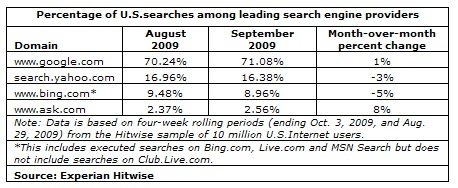
Here we have the search data for September from Experian Hitwise showing that Google accounted for 71.08% of all U.S. searches. Bing, Yahoo and Ask.com accounted for,  8.96%, 16.38%  and 2.56% respectively.

hitwisesearchdata

The search data was culled from all searches conducted for four weeks in September ending Oct. 3, 2009.

Google’s search data increased by 1% from August 2009, while both Bing and Yahoo suffered a decrease of -5% and -3% percent.

Interestingly, Ask.com’s share of  U.S. searches is a big 8% leap from its August share. And this might continue to increase especially with the Ask Deals service which Ask.com blended with its search engine.

Another interesting thing to note is the fact that despite the decrease in their search shares, combining Bing and Yahoo’s data still falls a little less than 50% of Google searches. The declining trend will certainly not help Bing and Yahoo to reach Google’s level. In addition, Bing’s data include searches made on Bing.com, Live.com and MSN Search but excluding those searches made on Club.Live.com.

Check out the SEO Tools guide at Search Engine Journal.

Google Adsense Account Banned? See here for how to get a Google Approved Adsense account with your name and address.. See this website for more details. http://googleadsenseaccount.wordpress.com/


If you enjoyed this post, make sure you subscribe to my  RSS Feeds !!

If you enjoyed this post, make sure you subscribe to my E-NewsLetter !!

Also follow me at twitter to know what I am doing.

Posted By: KirubaKaran

Microsoft Certified Technology Specialist

What Is PetaByte?

Mozy has put together a series of stats which can help you understand as how much data size a Petabyte contains. This image stat below is really amazing!

Whats a Petabyte

[via] Mozy – How Much Is A Petabyte?

Google Adsense Account Banned? See here for how to get a Google Approved Adsense account with your name and address.. See this website for more details. http://googleadsenseaccount.wordpress.com/


If you enjoyed this post, make sure you subscribe to my  RSS Feeds !!

If you enjoyed this post, make sure you subscribe to my E-NewsLetter !!

Also follow me at twitter to know what I am doing.

Posted By: KirubaKaran

Microsoft Certified Technology Specialist

Make Google To Crawl Your Blog

Sitemaps, in simple English, are text files (see example) containing a list of all web pages that exist on your site. It is important that you create a comprehensive sitemap as it will help Google and other search engines crawl your site better and that might mean more traffic coming your way in the long run.

The Problem with Blogger Sitemap Files

Ideally, the sitemap file should contain all URLs of a site but if your blog is hosted on blogspot.com (or if you are using a self-hosted version of Blogger with a custom domain), you’ll be surprised to know that the default sitemap file (see example) contains only the 26 most recent pages of your blog.

That’s a bad thing because some of your older blog pages, that are missing from the system-generated sitemap file, may never get indexed in search engines. There’s however a simple solution to fix this problem.

Generate a Complete Sitemap for your Blogger Blog

Step 1: If you haven’t done this already, sign-in to your Google Webmasters account and add your blog. For details, check this video tutorial on how to add a blog to Google.

Step 2: Once your blog is added to Google, open the Sitemap Generator and type the full address of your blogspot blog (or your self-hosted Blogger blog).

submit sitemaps

Step 3: What you get is list of sitemap files that contain each and every page of your blog. You now just have to ping Google, Yahoo and Bing to inform them about these XML sitemaps.

As shown in the video screencast below, you need to manually add each of the sitemap files into your Google Webmaster Tools dashboard but for Bing or Yahoo, you can simply click blue hyperlinks and these search engines will automatically download the relevant sitemap files from your blogspot site.


Once all the Sitemaps are added, your Google Dashboard should look something like this.

sitemap added to google

If you see a red cross or an orange exclamation symbol instead of the green tick, that means something is wrong with your XML sitemap. Verify that the file exists by typing the sitemap URL in your browser.

Sometimes media enclosures (like MP3 files) in blog posts can create warnings during sitemap submission. And if you have switched from Blogger to WordPress, it still makes sense to submit sitemaps of your old Blogspot blog as that will only help search engines discover your new WordPress pages. Good luck.

Source : www.labnol.org

Google Adsense Account Banned? See here for how to get a Google Approved Adsense account with your name and address.. See this website for more details. http://googleadsenseaccount.wordpress.com/


If you enjoyed this post, make sure you subscribe to my  RSS Feeds !!

If you enjoyed this post, make sure you subscribe to my E-NewsLetter !!

Also follow me at twitter to know what I am doing.

Posted By: KirubaKaran

Microsoft Certified Technology Specialist

Become WI-FI Certified

wifin

We’re pleased to say that 802.11n has finally been finalized (hmmm… “finally been finalized.” I see that’s why we make the big bucks, lol!). That’s right, you won’t be buying “draft n” routers anymore, as the Wi-Fi Alliance has updated its tests, going from “draft n” to “Wi-Fi Certified n.” Does that make a difference in your everyday computing? No, probably not—how many years now have we been using “draft n” items with nary an issue?

As far as “news” goes, it’s a pretty big deal. And maybe people who were afraid of buying “draft n” items will finally jump on board now. (I’ve been using a “draft n” router for about four months now, and there hasn’t been any issues. It’s fast, and it works. That’s all I need in a router.)

Proper n devices will be able to accept up to four streams of data, though such a device doesn’t exist yet. I don’t see too many reasons why a consumer-level router would need more than one stream (or two if you have old equipment that can only accept an 802.11b/g signal), but it’s there. No complaining!

Google Adsense Account Banned? See here for how to get a Google Approved Adsense account with your name and address.. See this website for more details. http://googleadsenseaccount.wordpress.com/


If you enjoyed this post, make sure you subscribe to my  RSS Feeds !!

If you enjoyed this post, make sure you subscribe to my E-NewsLetter !!

Also follow me at twitter to know what I am doing.

Posted By: KirubaKaran

Microsoft Certified Technology Specialist

Recent Posts